

Same-Day Printer Repair in Spring TX — In-Store on FM 1960 or Mobile to Your Door
Call Us Now!
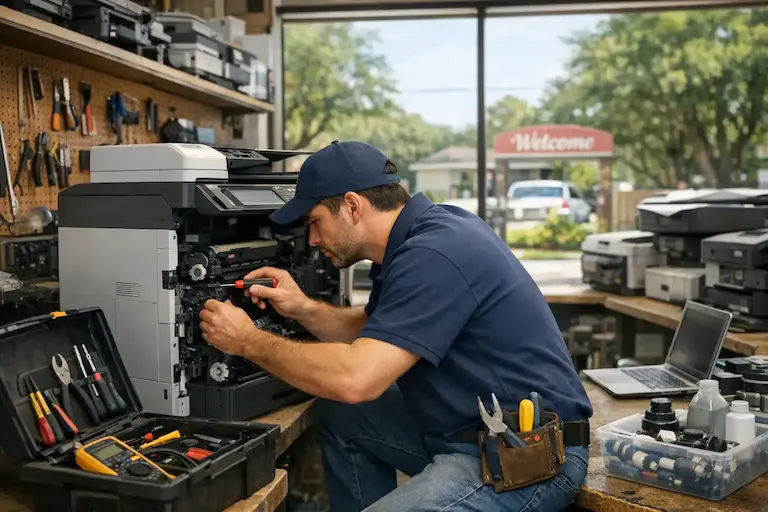
It is the morning of a Klein ISD science fair and the printer stops working. The project is finished. The files are ready. The printer refuses to print. This is exactly the situation that printer repair Spring TX service exists to solve. At Harry Repairs, professional printer repair in Spring TX is available both in-store at the FM 1960 shop and through mobile visits directly to any Spring TX home or business. Whether the printer jams constantly, prints blank pages, shows an error code that will not clear, or has gone completely offline, Harry Repairs diagnoses the real cause and fixes it properly. Call (346) 367-5911 right now for same-day printer repair in Spring TX.
For all 10 device repair services in Spring TX, visit the Spring TX Device Repair Hub.
Why Printers in Spring TX Break Down More Often Than Expected
Spring TX creates specific conditions that cause printers to fail faster and more frequently than most manufacturers account for. Understanding these conditions helps Spring TX residents and businesses respond quickly when problems appear.
Spring TX Home Office Culture Puts Printers Under Heavy Strain
The FM 1960 corridor is home to thousands of Spring TX residents who work remotely from home offices throughout Cypresswood, Gleannloch Farms, Northampton, and Spring Creek Forest. These home office printers run every single day — printing client documents, contracts, invoices, reports, and presentations that used to be handled by corporate office equipment. Furthermore, Klein ISD families add another layer of daily printer demand. Research papers, science fair projects, book reports, college application essays, and school permission slips all come out of the same home printer that is already working hard for a remote worker. This level of combined daily use accelerates wear on rollers, feed mechanisms, and print heads far faster than a printer used occasionally ever experiences.
Spring TX New Home Mesh Networks Disconnect Printers
Spring TX is one of Greater Houston’s fastest-growing communities. Thousands of new families move into Bridgestone, Windrose, Devonshire Woods, and surrounding neighborhoods every year and set up home networks for the first time. New Spring TX builds frequently use mesh Wi-Fi systems that create seamless coverage across large homes using multiple nodes. Printers struggle with mesh networks in ways that laptops and phones do not. Many HP, Canon, and Epson printers require a 2.4 GHz network signal but connect to the 5 GHz band by mistake on mesh systems. When a Spring TX family moves into a new home and their printer worked perfectly at the old address, the new mesh router is almost always the reason it no longer connects. Harry Repairs resolves these network-specific printer connectivity issues quickly and ensures the connection stays stable.
Spring TX Summers Damage Ink Cartridges in Unused Printers
Spring TX summers are particularly damaging to inkjet printers that sit unused for extended periods. When a printer sits through a Spring TX summer in a home office without full air conditioning — a spare room, a converted garage, or a south-facing study — the heat causes ink inside cartridges and print heads to thicken and dry out completely. As a result, the printer appears fully loaded with ink but produces blank pages or heavy streaks because the dried ink blocks the nozzle entirely. This problem is far more common in Spring TX than in cities with milder summers and affects printers that work perfectly in winter but fail completely when turned on again after months of disuse.
Spring TX Storm Season Damages Printer Circuit Boards
The FM 1960 corridor sits in Harris County’s storm belt. During hurricane season and summer thunderstorms, power surges reach Spring TX homes with enough voltage to silently damage the circuit board, firmware memory, and power supply inside a printer. Unlike computers which usually show obvious failure signs after a surge, printers often develop subtle problems — error codes that appeared after a storm, Wi-Fi that permanently disconnected, or print quality that degraded without any obvious physical cause. Consequently, many Spring TX residents replace ink cartridges trying to fix a print quality problem that was actually caused by storm surge damage to the printer’s internal electronics.
Spring TX Construction Dust Clogs Printer Vents and Feed Mechanisms
Spring TX’s rapid residential growth means active construction is happening near homes throughout the community. Construction dust is exceptionally fine and penetrates printer vents easily, building up on rollers, sensors, paper feed mechanisms, and internal components. Printers in Spring TX homes near active building sites experience roller wear, sensor failures, and paper jam problems significantly sooner than printers in settled neighborhoods. Regular cleaning is more important in Spring TX than almost anywhere else in Greater Houston.
Common Printer Problems Harry Repairs Fixes in Spring TX
Printer Not Printing After a Spring TX Storm
This is the most urgent printer problem Harry Repairs handles in Spring TX. After a storm knocks out power along the FM 1960 corridor, many Spring TX residents find their printer shows constant error codes, refuses to connect to Wi-Fi, or produces garbled output. The cause is usually corrupted firmware or a damaged circuit board from the power surge. A restart rarely fixes this. The technician diagnoses whether the issue is firmware-level or requires board replacement and resolves it the same day in most cases.
Blank Pages Despite Full Ink Cartridges
A printer that produces blank pages with apparently full cartridges is one of the most frustrating problems Spring TX residents face — especially when it happens right before a Klein ISD deadline. The cause is almost always dried ink blocking the print head nozzles after the printer sat unused through a Spring TX summer. The technician performs a professional print head cleaning that goes significantly deeper than the built-in software cleaning cycle, restoring proper ink flow without replacing expensive cartridges unnecessarily.
Printer Constantly Going Offline in Spring TX
Wireless printers in Spring TX homes go offline constantly for reasons that have nothing to do with the printer itself. Mesh network systems assign different IP addresses to the printer after every restart. Router firmware updates change network settings that the printer cannot adapt to automatically. Harry Repairs stabilizes the printer’s network connection properly — assigning a fixed IP address where needed and configuring the correct network settings — so it stays connected reliably.
Frequent Paper Jams
Frequent paper jams in Spring TX printers almost always point to worn rollers that can no longer grip paper correctly, debris inside the paper path from dust or torn paper fragments, or warped paper trays from heat exposure. In particular, Spring TX residents who use their printer in non-air-conditioned rooms notice paper jam problems starting sooner than average because heat warps both the paper and the plastic components inside the printer. The technician cleans the paper path thoroughly, replaces worn rollers, and realigns paper trays to eliminate recurring jams permanently.
Streaks, Lines, or Faded Print Quality
Print quality problems in Spring TX printers have two main causes depending on the season. During summer, dried ink from heat exposure causes streaks and faded output on inkjet printers. During and after storm season, subtle damage to the printer’s fuser unit or drum causes streaks on laser printers. Therefore, Harry Repairs identifies the exact cause before recommending any parts replacement — which is why Spring TX customers rarely end up buying new cartridges for a problem that was actually mechanical.
Persistent Printer Error Codes
Error codes that persist after restarting the printer point to specific internal component failures. The most common causes in Spring TX printers include paper sensor failures from dust buildup, fuser unit errors from heat stress, and firmware corruption from power surges. Harry Repairs identifies exactly what each error code means for the specific printer model and resolves the underlying cause rather than just clearing the code temporarily.
Safe DIY Checks to Try Before Calling for Printer Repair in Spring TX
These steps are safe and will not damage the printer. However, if none of them resolve the issue, the problem needs professional diagnosis.
After a Spring TX Storm or Power Outage
Unplug the printer completely from the wall for at least 60 seconds — not just the power button. This forces a full reset of the firmware. Then plug it back in and allow it to complete its full startup cycle without pressing any buttons. Check whether the Wi-Fi reconnects automatically. If the printer shows the same error codes after a full power cycle, the surge caused internal damage that needs professional assessment. Call (346) 367-5911 for same-day printer repair Spring TX service.
When the Printer Goes Offline on a Spring TX Mesh Network
First restart both the printer and the main router node completely. Then check the printer’s network settings to confirm it is connecting to the 2.4 GHz network band rather than the 5 GHz band. On HP printers, use the HP Smart app to reconnect. On Canon and Epson printers, use the wireless setup wizard from the printer menu. If the printer goes offline again within 24 hours, the network needs a fixed IP configuration that a technician can set up properly.
When a Klein ISD Deadline Cannot Wait
If the printer is producing blank pages, first remove the ink cartridges and gently wipe the copper contacts with a dry cloth. Reinstall them firmly and run the printer’s built-in cleaning cycle twice. If print quality does not improve after two cleaning cycles, do not run more cycles — additional cleaning cycles waste ink without fixing dried nozzles. Call (346) 367-5911 immediately. Harry Repairs prioritises urgent printer repairs for Klein ISD families facing deadlines.
Our Printer Repair Process for Spring TX Customers
Every printer repair Spring TX job at Harry Repairs follows a clear process so customers always know exactly what is happening and what it will cost before any work begins.
Step 1 — Full Diagnostic Including Network and Computer
The technician examines the printer, the network connection, and the computer’s printer driver configuration. Many Spring TX printer problems are not inside the printer at all — they are driver conflicts on the computer, network configuration issues, or router settings causing the printer to behave incorrectly. Getting the diagnostic right from the start prevents unnecessary parts replacement.
Step 2 — Clear Explanation and Upfront Quote
Before any work begins, the technician explains exactly what is wrong, what caused it, what the repair involves, and the exact cost upfront. Spring TX customers never receive a price that changes between drop-off and collection.
Step 3 — Professional Repair Using Quality Parts
The technician completes the repair using quality components matched to the specific printer brand and model. Roller replacements, fuser units, print head assemblies, and circuit boards all meet or exceed the original manufacturer’s specifications.
Step 4 — Full Print Test Before Return
After every repair, the technician prints multiple test pages to verify print quality, paper feed, connectivity, and all printer functions before considering the job complete. The printer only leaves when every test confirms it performs correctly.
Step 5 — Warranty and Ongoing Support
Every printer repair Spring TX job comes with a warranty on parts and labour. If the same issue returns after repair, Harry Repairs fixes it. Spring TX customers can also call (346) 367-5911 for guidance if any printer questions arise after collection.
In-Store and Mobile Printer Repair in Spring TX
Drop Off at the FM 1960 Shop
The Harry Repairs shop is located at 3934 Farm to Market 1960 Rd W, Houston, TX 77068. The shop is open 7 days a week from 10 AM to 8 PM. Walk-ins are always welcome.
Spring TX residents can bring printers directly to the FM 1960 shop for same-day repair. The shop is minutes from every Spring TX neighborhood. For most Spring TX residents, dropping off a printer in the morning means picking it up repaired the same afternoon. The shop handles everything from basic connectivity fixes to print head replacements and circuit board repairs.
Mobile Printer Repair — Harry Repairs Comes to Spring TX
For Spring TX home offices and small businesses where the printer is part of a larger network setup, mobile repair is the most effective option. The technician comes directly to the Spring TX address with all tools needed to repair the printer and configure it correctly within the existing network environment.
Mobile printer repair Spring TX service is particularly valuable for Klein ISD families who need their printer working before school the next morning. It is also ideal for FM 1960 home office workers who cannot leave their desk during client hours. Spring TX small business owners who need the printer configured on their specific business network also get the best results from a mobile visit. Additionally, anyone setting up a printer on a Spring TX mesh network benefits from having a technician configure it on-site within the actual network environment.
Mobile service reaches every Spring TX neighborhood at no extra charge. Call (346) 367-5911 to schedule same-day mobile printer repair in Spring TX.
Printer Brands Harry Repairs Services in Spring TX
Harry Repairs provides printer repair Spring TX service for all major printer brands used in Spring TX homes and businesses.
HP — OfficeJet, DeskJet, LaserJet, Envy, Smart Tank, and all HP printer lines used in Spring TX home offices and businesses.
Canon — PIXMA, MAXIFY, and imageCLASS series printers used by Spring TX families and small businesses.
Brother — HL, MFC, and DCP series inkjet and laser printers widely used by Klein ISD families and Spring TX home offices.
Epson — EcoTank, WorkForce, and Expression series — particularly common in Spring TX homes due to the EcoTank’s low running cost.
Lexmark, Samsung, Dell, Xerox, and Ricoh — all home and small office models used throughout Spring TX.
If the brand or model is not listed, call (346) 367-5911 to confirm. Harry Repairs services virtually every printer available in Spring TX.
If the printer issue is connected to a computer-side driver conflict or software problem, Computer Repair Spring TX service resolves computer-related printer issues alongside the printer repair in a single visit or if its connected to a laptop, Laptop Repair Spring TX service will take care of it
Spring TX Neighborhoods Harry Repairs Serves for Printer Repair
Harry Repairs provides in-store and mobile printer repair Spring TX service throughout all Spring TX neighborhoods including Cypresswood, Cypresswood Glen, Champion Forest, Memorial Northwest, Gleannloch Farms, Northampton, Spring Creek Forest, Terranova, Windrose, Bridgestone, Devonshire Woods, Spring Shadows, and all surrounding Spring TX communities.
If your Spring TX office also has a commercial copier that needs attention, visit Copier Repair Spring TX for same-day on-site commercial copier service throughout Spring TX.
Frequently Asked Questions — Printer Repair Spring TX
How long does printer repair take in Spring TX?
Most printer repairs complete the same day. Simple fixes like connectivity restoration, driver reinstallation, and print head cleaning take 1 to 2 hours. Hardware repairs such as roller replacement and fuser unit replacement vary by model. Harry Repairs always provides a realistic timeframe before starting so Spring TX customers can plan accordingly.
Do you offer same-day printer repair in Spring TX?
Yes. Harry Repairs prioritizes same-day printer repair for Spring TX customers both in-store and through mobile visits. Call (346) 367-5911 early in the day for the best same-day availability. Walk-ins are always welcome at the FM 1960 shop.
Can you come to my home in Spring TX to repair my printer?
Absolutely. Harry Repairs provides mobile printer repair throughout every Spring TX neighborhood at no extra charge. A technician comes directly to the home or business with all tools needed to complete most repairs on-site. Mobile service is particularly useful when the printer needs to be configured within an existing Spring TX home network.
My printer stopped working after a Spring TX storm. Can it be repaired?
Yes. Storm surge damage to printer electronics is one of the most common printer repair Spring TX cases Harry Repairs handles. Whether the damage affects the circuit board, firmware, or power supply, the technician diagnoses the exact cause and repairs it. Call (346) 367-5911 for same-day assessment after any storm-related printer failure.
Why does my printer keep going offline in Spring TX?
The most common cause in Spring TX is the home mesh network assigning a new IP address to the printer after every restart. New Spring TX developments with mesh Wi-Fi systems cause this problem constantly. Harry Repairs resolves it by configuring a fixed IP address for the printer and ensuring it connects to the correct network band reliably.
What printer brands do you repair in Spring TX?
Harry Repairs services all major brands including HP, Canon, Brother, Epson, Lexmark, Samsung, Dell, Xerox, and Ricoh. Both inkjet and laser printers are covered, including all-in-one models that print, scan, copy, and fax.
Is it better to repair or replace my printer?
For printers less than 10 years old with a single mechanical issue, repair is almost always more cost-effective than replacement. Harry Repairs always gives an honest assessment — if replacement makes more sense for the specific situation, that is exactly what the technician will recommend.
Is weekend printer repair available in Spring TX?
Yes. Harry Repairs operates 7 days a week from 10 AM to 8 PM. Both in-store walk-ins and mobile visits to Spring TX are available on Saturdays and Sundays — because printer failures do not wait for Monday morning.
My printer produces blank pages even with new cartridges. What is wrong?
This is almost always a dried print head caused by the printer sitting unused through a Spring TX summer in a non-air-conditioned room. New cartridges will not fix a blocked print head. Harry Repairs performs a professional deep cleaning that restores proper ink flow without replacing cartridges unnecessarily. Call (346) 367-5911 for same-day printer repair Spring TX service.
Get Fast Printer Repair in Spring TX Today
A broken printer brings Spring TX home offices, school projects, and small businesses to a complete halt. Whether it needs same-day in-store service at the FM 1960 shop or a mobile technician arriving directly at the Spring TX door, Harry Repairs delivers fast, professional, and guaranteed printer repair Spring TX service with honest upfront quotes, no hidden fees, and a warranty on every repair.
Call (346) 367-5911 now.
Shop: 3934 Farm to Market 1960 Rd W, Houston, TX 77068
Open 7 days a week, 10 AM to 8 PM. Walk-ins always welcome.
Mobile service available throughout Spring TX at no extra charge.