

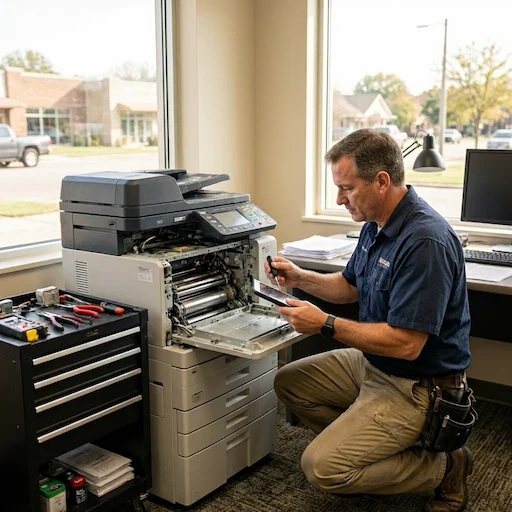
Same-Day Copier Repair in Spring TX — On-Site Service for Every Spring TX Office and Business
Call Us Now!
Your copier stops mid-job on a busy Tuesday morning. Contracts are waiting to be printed. The team cannot scan documents to send out. Every hour that machine stays down costs your Spring TX business real money. That is exactly the situation that Harry Repairs exists to solve. Professional copier repair Spring TX service reaches your office through same-day on-site visits anywhere in Spring TX — because commercial copiers are not devices you can simply pack into a car and drive to a shop. Call (346) 367-5911 right now and get a technician to your Spring TX location today.
For all 10 device repair services in Spring TX, visit the Spring TX Device Repair Hub.
Spring TX Businesses That Cannot Afford Copier Downtime
Spring TX has grown into a significant commercial hub along the FM 1960 corridor. The businesses operating here depend on their copiers from the moment the office opens until the last person leaves. When a copier fails, the disruption hits every team member immediately.
Spring TX Real Estate Offices
Spring TX is in the middle of one of the strongest residential growth periods in its history. Real estate agencies working throughout the FM 1960 corridor process contracts, disclosure forms, inspection reports, and closing documents at a pace that makes copier uptime essential every single day. A copier failure during an active closing week creates immediate problems for your agents, your buyers, and your sellers. Harry Repairs therefore prioritizes real estate office copier repair Spring TX calls because the timing of these repairs directly affects whether transactions close on schedule.
Spring TX Medical Clinics and Healthcare Facilities
The Klein and Spring TX area has seen significant growth in medical clinics and specialist offices over recent years. Your office processes patient intake forms, insurance documentation, referral letters, and lab result printouts throughout every operating day. Medical offices in Spring TX also carry specific document handling obligations that make copier reliability a compliance matter, not just an operational one. Because of this, Harry Repairs provides on-site copier repair Spring TX service for medical facilities. Consequently, your equipment never leaves your premises during the repair process.
Spring TX Oil and Gas Support Offices
A significant portion of Spring TX professionals work in oil and gas, engineering, and energy sector support roles. Many of these offices process technical documents, field reports, safety certifications, and engineering drawings at high volume throughout the working week. These document types are often time-sensitive and project timelines do not wait for equipment downtime. When your copier fails in this environment, Harry Repairs responds quickly with a same-day visit to your Spring TX location.
Spring TX Small Businesses Along the FM 1960 Corridor
The FM 1960 corridor is home to hundreds of small businesses — accounting firms, legal offices, insurance agencies, staffing companies, and professional service providers. Most of these businesses operate with a single copier that handles all printing, scanning, and copying for the entire office. When that machine fails, there is no backup and the entire document workflow stops. Consequently, Harry Repairs treats single-copier Spring TX business calls with the same urgency as large office accounts — because for your business, that one machine is everything.
Why Your Spring TX Office Copier Breaks Down More Often Than You Expect
Spring TX creates specific conditions that affect commercial copier reliability in ways that differ from established Houston business districts. Understanding these factors helps you act faster when something goes wrong.
Spring TX Storm Season Power Surges Hit Copier Electronics Hard
Spring TX sits in Harris County’s storm corridor and experiences power disruptions during hurricane season and summer thunderstorm periods more frequently than many parts of the Houston metro area. Commercial copiers contain sensitive electronic control boards, fuser controllers, and network interface cards that are particularly vulnerable to voltage irregularities. When power is restored after a Spring TX outage, the surge that accompanies restoration can damage these components without leaving any visible sign of the fault. Your copier powers on normally the next morning but then produces errors, fails mid-job, or refuses to scan. Additionally, these faults often appear days after the storm rather than immediately, so many Spring TX business owners never connect the failure to the weather event that caused it.
Spring TX Commercial Construction Creates Damaging Dust Conditions
Spring TX’s rapid commercial and residential expansion means construction activity is ongoing throughout the area. Many office buildings, strip mall units, and business suites sit adjacent to active construction sites. The fine particulate dust generated by this construction behaves differently inside copier mechanisms than ordinary office dust. It is finer, denser, and more adhesive. It penetrates ADF rollers and sensor pathways more aggressively, builds up on drum surfaces faster, and creates paper feeding problems that worsen progressively until your machine needs professional cleaning. Furthermore, businesses in newer Spring TX commercial developments typically need copier maintenance more frequently than they expected when they moved in.
New Spring TX Office Suites Have Inconsistent Climate Control
Newer commercial buildings along the FM 1960 corridor are still settling into their HVAC systems. Strip mall end units, recently completed office suites, and buildings with copiers placed near exterior walls experience temperature variations throughout the day. Commercial copiers operate within specific temperature and humidity ranges. Units exposed to inconsistent climate control develop drum and fuser issues faster than equipment in stable environments. This is a pattern Harry Repairs sees specifically in newer Spring TX commercial locations, and it explains why some businesses find their copier developing problems just months after installation.
Your Spring TX Business Has Grown Into Higher Copier Volumes
Many Spring TX businesses have grown significantly over the past few years. A copier that handled a team of five comfortably may now be serving a team of fifteen. Drums wear at accelerated rates when print volumes exceed design specifications. Fuser units reach end-of-life sooner. ADF rollers require replacement more frequently. In short, if your Spring TX business has grown quickly, your copier has been absorbing that growth silently — until it stops working.
Common Copier Problems Harry Repairs Fixes in Spring TX
Scan-to-Email and Scan-to-Folder Failures
Scan-to-email is one of the most relied-upon functions in Spring TX medical offices, legal firms, and professional services businesses. When this function fails, your team cannot send documents electronically and the entire document dispatch workflow breaks down. The failure usually stems from network configuration changes, SMTP server authentication issues following an email system update, or calibration drift in the scanner assembly. Harry Repairs diagnoses the exact cause within your copier network and software configuration and, as a result, restores full scan-to-email functionality during the on-site visit.
High-Volume Drum Degradation
The imaging drum inside a commercial copier has a finite print cycle lifespan. In Spring TX offices that have increased their document volumes significantly, drums reach the end of their cycle faster than expected. The first sign is usually slightly uneven toner reproduction across the page. Furthermore, this progresses quickly if the drum continues to run past its rated cycle. This progresses to visible lines at regular intervals corresponding to the drum circumference. Eventually, copy quality degrades to a point where documents are not presentable to clients. Harry Repairs replaces drums in all major commercial copier brands and recalibrates the imaging system after installation to restore output quality to factory standard.
ADF Misfeeds and Document Feeding Problems
ADF jams and misfeeds are a consistent problem in Spring TX offices that process large batches of documents regularly. The ADF pickup rollers and separation pads are consumable components that wear out according to the number of pages fed through them. In a busy Spring TX real estate or medical office, these components reach their replacement threshold significantly faster than annual maintenance cycles typically catch. When your ADF begins misfeeding, skewing pages, or pulling multiple sheets simultaneously, Harry Repairs carries replacement ADF components for all major commercial brands and completes the repair on-site.
Copier Error Codes That Keep Returning
Persistent error codes on Canon, Ricoh, Konica Minolta, and Xerox copiers indicate specific hardware faults that a simple restart cannot resolve. Toner system errors, fuser temperature warnings, drum unit alerts, and scanner calibration codes all point to underlying mechanical or electronic issues. Harry Repairs identifies exactly what each error code means for your specific copier model and resolves the root cause rather than simply clearing the display.
Network Printing Failures After Office IT Changes
Spring TX businesses that have recently upgraded their office network, changed their internet service provider, or added new workstations sometimes find their copier no longer receives print jobs reliably. Your copier’s stored network configuration no longer matches the current office environment. Print queues on individual workstations accumulate jobs that never process. Harry Repairs reconfigures your copier’s network settings, updates IP address assignments, and verifies connectivity from every workstation so your entire Spring TX office can print reliably again.
Finisher and Stapler Unit Failures
High-end commercial copiers in Spring TX offices frequently include finisher units that staple, sort, and collate document sets automatically. These components are vulnerable to paper quality variations and mechanical wear from heavy usage. When a finisher jams or the stapler unit fails, the copier often holds all pending jobs waiting for the finisher to clear. Harry Repairs services finisher units on all major commercial copier models and resolves both mechanical jams and component failures that need parts replacement.
Safe Steps to Try Before Calling for Copier Repair in Spring TX
These steps are safe and sometimes resolve issues without needing a technician. However, if none of them work, your copier needs professional diagnosis.
When Your Copier Shows an Error Code
First, power off the copier completely and unplug it from the wall for 60 seconds. Power it back on and allow it to complete its warm-up cycle fully before sending any jobs. If the error code returns immediately after warm-up, note the exact code shown on the display and call (346) 367-5911. Error codes that return after a full power cycle almost always indicate a hardware fault that needs professional attention.
When the Copier Stops Scanning to Email
First, restart the copier and the office router. Then print a network configuration page from the copier’s menu to confirm the device still has a valid IP address. Check that the email address stored in the scan destination settings has not changed following any recent email system update. If the scan-to-email function still fails after these steps, the issue is deeper than a simple connectivity reset and requires professional diagnosis.
When Paper Keeps Jamming
Open all access panels and remove any stuck paper slowly, pulling in the direction of the paper path. Check thoroughly for small torn pieces inside the machine — even a small scrap causes repeated jams. Clean the rollers visible through the access panels with a dry lint-free cloth. If jams continue after clearing and cleaning, your rollers need professional inspection and likely replacement.
Our Copier Repair Process for Spring TX Businesses
Every copier repair Spring TX job at Harry Repairs follows a clear process so you always know exactly what is happening and what it will cost before any work begins.
Step 1 — On-Site Diagnostic
The technician arrives at your Spring TX office and examines the copier thoroughly — checking mechanical components, error logs, network connections, toner and drum status, and print output. This step identifies the root cause rather than just the surface symptom, which is why Harry Repairs rarely misdiagnoses a fault or replaces parts that did not need replacing.
Step 2 — Clear Explanation and Upfront Quote
Before any work begins, the technician explains exactly what is wrong, what the repair involves, how long it will take, and the full cost. Your Spring TX business receives a transparent quote before work starts. Harry Repairs charges no hidden fees and adds no surprise charges after the job completes.
Step 3 — Professional Repair Using Quality Parts
The technician completes the repair using high-quality replacement components designed for commercial copier models. Every part installed meets or exceeds the original manufacturer’s specifications. Whether the repair involves a drum unit, fuser assembly, ADF roller kit, or electronic control board, the components used are built for long-term commercial reliability.
Step 4 — Full System Test Before Leaving
After the repair, the technician runs multiple copy, print, and scan tests to confirm the machine performs correctly across all functions. The technician does not leave your Spring TX office until every function the copier is supposed to perform has been verified as working correctly.
Step 5 — Warranty and Maintenance Guidance
Every copier repair Spring TX job comes with a warranty on parts and labour. If the same issue returns after the repair, Harry Repairs returns to resolve it at no additional charge. The technician also provides practical maintenance guidance specific to your Spring TX office environment — including cleaning frequency recommendations for offices near construction sites and surge protection advice relevant to Spring TX storm season.
Why Spring TX Businesses Choose Harry Repairs for Copier Service
Spring TX businesses return to Harry Repairs for copier repair because the service is built around minimising your downtime — not around what is convenient for the repair shop.
Same-Day On-Site Response
When your copier goes down, every hour matters. Harry Repairs prioritises same-day on-site service for Spring TX businesses. Most copier repair Spring TX calls placed early in the day receive a same-day technician visit. Call (346) 367-5911 as early as possible to secure same-day availability.
Transparent Pricing With No Surprises
Every copier repair starts with a clear explanation of the problem and an honest upfront quote. You know exactly what the repair costs before the technician picks up a single tool. There are no hidden fees added at the end and no charges for parts that were not discussed before the work began.
Warranty on Every Repair
Harry Repairs stands behind every repair with a warranty on both parts and labour. If the same fault returns within the warranty period, Harry Repairs fixes it. That is the level of confidence the team has in the quality of its work.
Commercial Copier Expertise
The Harry Repairs technicians have extensive experience with all major commercial copier brands used in Spring TX offices. In particular, the team understands the specific failure patterns that affect copiers in Spring TX’s commercial environment — storm surge damage, construction dust accumulation, and high-volume wear from growing Spring TX businesses.
Copier Brands Harry Repairs Services in Spring TX
Harry Repairs provides copier repair Spring TX service for all major commercial brands used in Spring TX offices and businesses.
Canon imageRUNNER and imageRUNNER ADVANCE series are among the most widely used commercial copiers in Spring TX offices. Harry Repairs services all models including multifunction configurations with finisher units.
Ricoh IM and MP series machines are common throughout Spring TX medical and professional offices. Harry Repairs carries parts and has hands-on experience with the full Ricoh commercial range.
Konica Minolta bizhub series copiers serve many Spring TX businesses that need high-volume colour printing capability. Harry Repairs services all bizhub machines including those with advanced finishing options.
Xerox VersaLink and AltaLink series are used by Spring TX businesses that need cloud-connected document workflows. Harry Repairs diagnoses and repairs both hardware faults and connectivity issues on these machines.
Sharp MX series multifunction copiers are present throughout Spring TX commercial premises. Harry Repairs services the full Sharp MX range including scanning and finishing system faults.
Kyocera ECOSYS and TASKalfa series machines are popular in Spring TX offices that prioritise lower running costs. Harry Repairs services Kyocera machines including drum unit and developer unit replacements.
If your copier brand or model is not listed, call (346) 367-5911 to confirm. Harry Repairs services virtually every commercial copier brand operating in Spring TX.
For Spring TX homes and small offices using desktop inkjet or laser printers rather than commercial copiers, Printer Repair Spring TX handles all home and small office printer repairs.
Spring TX Areas Harry Repairs Serves for Copier Repair
Harry Repairs provides on-site copier repair Spring TX service to businesses throughout the Spring TX area. This includes all commercial locations along the FM 1960 corridor, the Klein area business district, medical office clusters near Spring TX healthcare facilities, and commercial premises throughout Cypresswood, Champion Forest, Memorial Northwest, Gleannloch Farms, Northampton, Windrose, Bridgestone, Spring Creek Forest, Terranova, and all surrounding Spring TX communities. Harry Repairs offers same-day on-site service throughout every one of these areas at no extra charge.
Frequently Asked Questions — Copier Repair Spring TX
How quickly does copier repair Spring TX service reach my office?
Harry Repairs prioritizes same-day response for Spring TX businesses. Most copier repair Spring TX calls placed early in the day receive a same-day technician visit. Call (346) 367-5911 as early as possible to secure same-day service for urgent copier failures.
Do you come to our Spring TX office or do we bring the copier to you?
Harry Repairs comes directly to your Spring TX office. Commercial copiers are large, heavy machines that cannot be transported without risk of damage. A technician visits your location with all tools and commonly required parts to complete most repairs on-site in a single visit. For smaller desktop copiers that can be transported safely, the FM 1960 shop at 3934 Farm to Market 1960 Rd W, Houston, TX 77068 offers fast same-day in-store service.
What copier brands do you repair in Spring TX?
Harry Repairs services all major commercial brands operating in Spring TX including Canon, Ricoh, Konica Minolta, Xerox, Sharp, Kyocera, Toshiba, Brother, HP, and Lexmark. If your brand is not listed, call (346) 367-5911 to confirm availability.
Our Spring TX office copier stopped working after a storm. Can it be repaired?
In most cases yes. Storm-related copier failures in Spring TX are usually caused by power surge damage to the electronic control board or fuser controller. These components can often be replaced without requiring a full machine replacement. Call (346) 367-5911 to arrange a same-day diagnostic at your Spring TX location.
Our copier is leased. Can Harry Repairs still service it?
Yes. Harry Repairs services both owned and leased copiers. It is worth checking your lease agreement to understand which repairs your lessor’s maintenance plan covers and which fall outside that coverage. Harry Repairs discusses this with you honestly before any work begins so you know exactly where you stand.
How long does a typical copier repair take at a Spring TX office?
Most copier repairs at Spring TX office locations complete within two to four hours during the on-site visit. Straightforward repairs such as ADF roller replacement and network reconfiguration are typically faster. Drum and fuser unit replacement take longer but usually complete during the initial visit. Harry Repairs always gives you a realistic timeframe after the diagnostic before any work proceeds.
Do you offer copier repair on weekends for Spring TX businesses?
Yes. Harry Repairs operates seven days a week from 10 AM to 8 PM. Weekend copier repair Spring TX service is available for businesses that need their copier operational before Monday morning. Call (346) 367-5911 to confirm Saturday or Sunday availability for your location.
Can Harry Repairs fix the scan-to-email function on our Spring TX office copier?
Yes. Scan-to-email failures are one of the most common copier repair Spring TX requests from medical and professional service offices. Harry Repairs diagnoses and resolves both hardware and software causes of scan-to-email failure including network configuration issues, SMTP authentication problems, and scanner calibration faults — all during the on-site visit.
Get Fast Copier Repair for Your Spring TX Business Today
Your copier going down affects every person in your Spring TX office immediately. The longer it stays out of service, the larger the backlog grows. Whether the fault is a jammed ADF, a persistent error code, a scan-to-email failure, or a drum that has reached the end of its cycle, Harry Repairs delivers professional copier repair Spring TX service with same-day on-site response, transparent upfront pricing, no hidden fees, and a warranty on every repair.
Call (346) 367-5911 now.
Shop: 3934 Farm to Market 1960 Rd W, Houston, TX 77068
Open 7 days a week, 10 AM to 8 PM.
On-site service available throughout Spring TX at no extra charge.