

Your work laptop starts behaving strangely on a Monday morning in Bridgeland. Your VPN connection keeps dropping. Your banking app shows a login from a device you do not recognize. Your partner’s laptop on the same network starts slowing down too. This is not a coincidence. This is a virus spreading across your Cypress TX home network in real time. Every minute you wait, it reaches further. Professional virus removal Cypress TX service from Harry Repairs eliminates the infection completely across every affected device and secures the network so it cannot return. Call (346) 367-5911 right now for same-day help.
For all 10 device repair services in Cypress TX, visit the Cypress TX Device Repair Hub.
What Customers Say About Our Virus Removal Services In Cypress TX


Why Cypress TX Households Face a Different Kind of Virus Threat
Virus removal Cypress TX is not the same problem it is in other Houston suburbs. The specific combination of high household incomes, dual professional home offices, a rapidly growing new-resident population, and the Cy-Fair ISD school ecosystem creates infection risks and consequences that are genuinely different from anywhere else in Greater Houston.
Bridgeland and Towne Lake Dual Home Offices Mean Double the Corporate Exposure
Bridgeland’s median household income sits at $156,836, placing it in the 96th percentile nationally. In most Bridgeland and Towne Lake households, both you and your partner work in professional or corporate roles. Many of you work remotely from home offices using laptops connected to your employers’ systems via VPN. When one of those laptops gets infected, the malware does not stop at that device.
Credential-stealing malware captures your VPN login credentials, your corporate email password, and your cloud storage access from the infected machine. It then spreads silently across your home network to your partner’s work laptop. Consequently, a single virus infection in your Bridgeland home can compromise two entirely separate corporate networks simultaneously. Your employer’s IT security team may flag the breach before you even notice anything is wrong.
Harry Repairs treats dual home-office virus removal as a household-level emergency. The technician addresses both your machines and secures your shared network in a single visit so neither corporate account remains exposed.
Cypress TX ZIP Codes Are Specifically Targeted for Financial Fraud Malware
Cybercriminals do not target victims randomly. Instead, they profile ZIP codes based on income data, spending patterns, and financial account activity. ZIP codes 77433 and 77429 are among the highest-income communities in the Greater Houston area. This makes them specific targets for sophisticated banking trojans and investment account credential theft, not the generic adware that affects lower-income areas.
Banking trojans in Cypress TX homes work differently from basic viruses. They sit dormant on your infected computer, monitoring your browser activity silently. When you visit your bank’s website, they intercept the session and capture your login credentials before the page even loads. Your antivirus software may show no alerts because the trojan is specifically designed to evade standard detection tools.
Furthermore, investment account credential theft is particularly damaging in high-income households where your retirement accounts, brokerage portfolios, and savings represent substantial sums. Harry Repairs handles these sophisticated financial fraud malware infections with professional removal tools that go significantly beyond standard antivirus scanning.
Cy-Fair ISD Chromebooks Create a Cross-Contamination Risk Between School and Home
Cy-Fair ISD is the third largest school district in Texas with over 118,000 students. Specifically, the district issues Chromebooks to students across Bridgeland, Fairfield, Towne Lake, Longwood, and all Cypress TX communities. These school devices travel between the district network during the day and your family home network every evening.
When your Cy-Fair ISD student’s Chromebook connects to a home network that is already compromised, it can carry the infection back into school systems the following morning. The reverse is also true. A Chromebook that picks up a browser-based attack through a school network connection can introduce malware into your family home network when your student brings the device home. Most families do not realise that your school device and your personal laptop sitting on the same Wi-Fi network are sharing infection risk constantly.
Harry Repairs addresses both Cy-Fair ISD student devices and your personal household computers as part of a complete Cypress TX virus removal service. The technician understands how to clean school-issued Chromebooks properly without violating district device policies.
New Cypress TX Residents Connect Devices Before Securing the Network
ZIP code 77433 was the most moved-into community in the United States in 2025. Every new Bridgeland and Towne Lake resident goes through the same vulnerable window. Specifically, moving day means connecting your laptops, phones, and tablets to the builder-installed network immediately, before anyone has changed the router password or configured proper security.
Builder-installed networks in new Cypress TX homes frequently use default credentials that are publicly documented. Attackers who scan for new network connections in growing communities find these unprotected networks within days of activation. Consequently, your laptop connected to an unsecured builder network on moving day can be infected before you have even finished unpacking.
Additionally, your devices may have been secured under different network settings at your previous address. Firewall rules, trusted networks, and VPN configurations that worked at your old home may not apply correctly to your new setup. Harry Repairs sees this pattern regularly in Cypress TX and resolves both your active infection and your underlying network vulnerability in the same visit.
Community Spaces and Public Wi-Fi Create a Professional Laptop Risk Unique to Cypress TX
Bridgeland and Towne Lake are built around outdoor community living. In particular, the Lakeland Activity Center, The Boardwalk at Towne Lake, community pool areas, and trail-side cafes all offer Wi-Fi that residents connect to regularly. Many Cypress TX remote professionals work from these spaces, connecting corporate laptops to networks that are not secured to enterprise standards.
Connecting your work laptop to an unsecured community network without an active VPN exposes your corporate login credentials to anyone on the same network. This is particularly risky in Cypress TX because the community lifestyle actively encourages working from shared spaces. A single session at The Boardwalk on an unprotected connection can introduce a keylogger or credential harvester that captures weeks of your corporate activity before it is detected.
Warning Signs Your Cypress TX Computer Has a Virus
Early Signs to Act On Immediately
Your VPN connection drops repeatedly with correct credentials that worked fine before. Your corporate email starts sending messages you did not write. Your browser searches redirect to unfamiliar websites consistently. Financial account alert emails arrive for logins from unrecognised devices. Your antivirus disables itself without any action from you. Your partner’s laptop develops the same slowdown within days of the first one.
These early signs are critical for you to act on. The longer you wait, the further the infection spreads across your Cypress TX home network. Call (346) 367-5911 at the first sign of any of these symptoms for same-day virus removal Cypress TX service.
Advanced Signs the Infection Has Spread Beyond One Device
Multiple devices on your same network begin behaving strangely at the same time. Your Cy-Fair ISD student’s Chromebook triggers security alerts from the school system. Your router admin page becomes inaccessible or shows unfamiliar devices connected. Files on your shared home drive become inaccessible or display unfamiliar extensions. Your partner’s corporate IT department contacts them about a security breach on their account.
These advanced signs mean the infection has moved beyond any single device on your network. Cleaning one computer at this stage without addressing your network will not solve the problem. Harry Repairs addresses your entire Cypress TX home network, not just the device that first showed symptoms.
Why DIY Virus Removal Fails Cypress TX Professional Households
Surface Scans Cannot Remove the Infections Targeting High-Income Households
The banking trojans and credential-stealing malware specifically targeting Cypress TX’s wealthy ZIP codes are engineered to survive basic antivirus scans. They embed themselves in browser sessions rather than as detectable files. They also hide in scheduled tasks that reload the infection after every restart attempt. They specifically disable Windows Defender and other standard security tools as their first action after installation.
Running a free antivirus scan on your machine infected with this type of malware produces a clean result while the trojan continues to operate. You believe the problem is solved. The malware continues capturing your banking credentials. Harry Repairs uses professional removal tools that detect and eliminate these sophisticated threats at every layer, including the browser session hijackers and memory-resident infections that standard tools cannot see.
Cleaning One Device Leaves the Network Infected
The most common DIY mistake in Cypress TX dual home-office households is cleaning your infected laptop while leaving your partner’s work laptop untouched. Both your machines share the same home network. Your cleaned device reconnects to the network and is reinfected within hours from the second machine that was never treated.
Additionally, your home router itself may be compromised as an ongoing infection source. A router carrying malware continues to distribute the infection to every device that connects to it, including your Cy-Fair ISD student’s Chromebook, your phones, and any smart home devices on your network. Harry Repairs secures your router as part of every virus removal Cypress TX service where network compromise is identified.
What to Do Right Now If You Suspect a Virus in Your Cypress TX Home
The First 30 Minutes Matter Most
Disconnect both your work laptops from the corporate VPN immediately. Do not log out through the normal process. Simply close the VPN connection entirely. Contact your employer’s IT security team and tell them your home network may be compromised. This protects your corporate account from further activity while your machine is being cleaned.
Do not log into your bank, your brokerage, or any financial account from any device on your affected network. Do not attempt to transfer files between devices to preserve them. Do not run a free antivirus scan. Each of these actions risks triggering ransomware or spreading the infection further before professional removal begins.
Disconnect the Network Source If Possible
If you can access your router, power it off by unplugging it from the wall. This stops the infection from spreading to additional devices still connected to your network. Your internet will go down but the infection spread stops immediately. Call (346) 367-5911 immediately after disconnecting. Harry Repairs can reach most Cypress TX addresses the same day for urgent network-level infections.
Our Virus Removal Process for Cypress TX Households
Every virus removal Cypress TX service at Harry Repairs follows a complete process designed for the specific multi-device professional household that defines Cypress TX family life.
Step 1. Map the Entire Cypress TX Home Network First
Before touching any device, the technician identifies every connected device on your network. This includes both your work laptops, your personal phones, Cy-Fair ISD student devices, smart home systems, and any other connected equipment. Specifically, the map shows exactly how far the infection has spread and which devices need immediate attention versus monitoring.
This step is what separates professional virus removal from DIY attempts. You cannot clean what you cannot see. For instance, a device your household forgot was connected to the network can be reinfecting cleaned machines silently.
Step 2. Identify Every Active and Hidden Threat Across All Devices
Using professional tools that go well beyond standard antivirus scanning, the technician identifies every component of the infection on each affected device. Banking trojans operating in your browser memory, keyloggers recording every password you type, credential harvesters monitoring your VPN traffic, and rootkits embedded in the operating system are all identified before removal begins.
Additionally, the technician checks for scheduled tasks and startup entries designed to reload the infection after removal attempts. Missing these means the infection returns within hours of your cleaned machine restarting.
Step 3. Complete Manual Removal From Every Affected Device
The technician removes every infection component manually from each affected machine. Registry entries, browser session data, startup processes, hidden directories, and scheduled reload tasks are all addressed. Furthermore, Cy-Fair ISD Chromebooks receive appropriate handling that complies with district device policies while fully restoring security.
Every device in your household is treated, not just the one that first showed symptoms. This is the only approach that prevents the infection from bouncing back between machines on your same network.
Step 4. Secure the Cypress TX Home Network and Router
After cleaning every infected device, the technician secures your router. This means updating firmware, changing default credentials, reviewing connected devices for any unauthorised entries, and configuring network security settings appropriate for a dual home-office household. Smart home devices on your network receive credential updates where appropriate.
Additionally, VPN configurations on both your work laptops are reviewed to ensure your corporate network connections are secure going forward. The technician also advises you on safe practices for connecting to community Wi-Fi at Bridgeland Activity Center and The Boardwalk so future sessions do not reintroduce the same risk.
Step 5. Real-Time Protection and Corporate Account Recovery Guidance
Finally, the technician installs and configures real-time protection on every cleaned device and provides specific guidance relevant to your Cypress TX household. This includes what to tell your corporate IT security team about the breach, which of your passwords need changing immediately, and how to monitor your financial accounts for any suspicious activity in the days following the cleanup.
In-Store and Mobile Virus Removal in Cypress TX
Drop Off at the FM 1960 Shop
The Harry Repairs shop is at 3934 Farm to Market 1960 Rd W, Houston, TX 77068, open 7 days a week from 10 AM to 8 PM. From Cypress TX, most Bridgeland and Towne Lake residents reach the FM 1960 shop in 15 to 25 minutes. Walk-ins are always welcome. Most virus removal jobs complete the same day.
Mobile Virus Removal. Harry Repairs Comes to Cypress TX.
For most Cypress TX virus removal situations, mobile service is the better choice. When the infection has spread to multiple devices on your home network, bringing one machine to the shop leaves your other infected devices at home. The problem does not get solved. Therefore, a mobile visit addresses every affected device and secures your network in a single call.
Mobile virus removal Cypress TX service is particularly valuable for dual home-office households in Bridgeland and Towne Lake where both your work laptops need simultaneous treatment. It is also the safest option when a banking trojan or credential stealer is suspected, because transporting an actively infected machine risks spreading the infection through USB connections or shared storage on the way to the shop.
Mobile service covers every Cypress TX neighborhood including Bridgeland, Towne Lake, Fairfield, Longwood, BlackHorse Ranch, Copper Lakes, Stonegate, and all surrounding communities at no extra charge. Call (346) 367-5911 to confirm same-day availability for your Cypress TX address.
Cypress TX Neighborhoods Harry Repairs Serves for Virus Removal
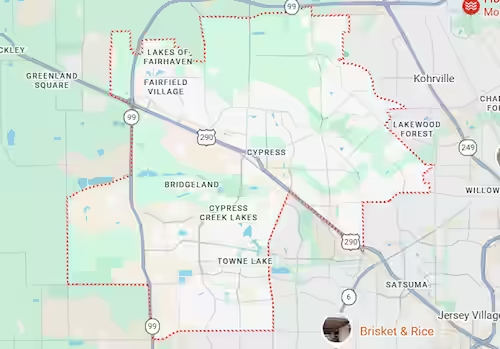
Harry Repairs provides in-store and mobile virus removal Cypress TX service throughout every Cypress TX neighborhood including Bridgeland, Towne Lake, Fairfield, Longwood, BlackHorse Ranch, Copper Lakes, Stonegate, Coles Crossing, and all surrounding communities across zip codes 77429 and 77433. Every address in Cypress TX falls within the mobile service area at no extra charge.
If the virus infection has caused file loss or data corruption alongside the malware, visit Computer Repair Cypress TX for combined computer repair and data recovery service. Harry Repairs handles both the infection and any resulting hardware or data issues in the same engagement.
If the virus infection has caused file loss or data corruption alongside the malware, visit Data Recovery Cypress TX for combined computer repair and data recovery service.
Frequently Asked Questions. Virus Removal Cypress TX.
How long does virus removal take in Cypress TX?
Most basic virus removal Cypress TX jobs complete the same day. Simple adware and browser redirect cleanup typically takes 1 to 2 hours. Advanced infections involving banking trojans, credential stealers, or network-level spread across multiple Cypress TX home devices take longer. Harry Repairs always gives you a realistic time estimate after the initial assessment so you can plan accordingly.
Can you clean both work laptops in our Bridgeland home in one visit?
Harry Repairs mobile visits to Cypress TX specifically handle dual home-office households. The technician comes prepared to clean multiple devices and secure the shared network in a single visit. Call (346) 367-5911 and explain the situation when booking so the technician arrives with the right tools for both machines.
My banking account shows a login I do not recognize. What should I do?
Contact your bank immediately and freeze the account. Then call (346) 367-5911 right now for same-day virus removal Cypress TX service. Do not log into any other financial account from any device on the same network until the cleanup is complete. Banking trojan infections in Cypress TX high-income households are a priority case at Harry Repairs.
Can you handle our Cy-Fair ISD student’s Chromebook as part of the cleanup?
Harry Repairs handles Cy-Fair ISD student devices alongside personal household computers as part of a complete virus removal Cypress TX service. School-issued Chromebooks are cleaned in a way that respects district device policies while fully restoring security. Call (346) 367-5911 and mention the school device when booking.
Will virus removal Cypress TX service affect our corporate VPN access?
Harry Repairs restores VPN functionality as part of the cleanup rather than disrupting it. The technician reviews VPN configuration on both work laptops after removal to ensure corporate connections are secure going forward. Your employer’s IT team will be able to see that the device is clean when you reconnect.
We recently moved to Bridgeland. Could our network already be compromised?
New Cypress TX residents are in a vulnerable window during the first 90 days after moving in. Builder-installed networks often use default credentials. Harry Repairs can audit your network security and clear any existing infections in a single mobile visit to your new Bridgeland or Towne Lake address. Call (346) 367-5911 to schedule a same-day network assessment.
Is mobile virus removal available throughout Cypress TX?
Harry Repairs sends mobile technicians to every Cypress TX neighborhood including Bridgeland, Towne Lake, Fairfield, Longwood, BlackHorse Ranch, Copper Lakes, Stonegate, and all surrounding communities. Mobile service carries no extra charge. Call (346) 367-5911 for same-day mobile availability at your specific Cypress TX address.
Is weekend virus removal available in Cypress TX?
Harry Repairs operates 7 days a week from 10 AM to 8 PM. Both in-store walk-ins and mobile visits to Cypress TX are available on Saturdays and Sundays. A banking trojan infection or credential theft does not wait for Monday morning and neither does Harry Repairs.
Get Fast Virus Removal in Cypress TX Today
Every hour a virus runs on your Cypress TX computer it causes more damage. Banking credentials get captured. Corporate accounts get compromised. The infection spreads from your work laptop to your partner’s work laptop to your student’s Cy-Fair ISD device. The longer it runs, the more complex and costly the cleanup becomes.
Whether your Cypress TX household needs same-day in-store service at the FM 1960 shop or a mobile technician arriving directly at your Bridgeland or Towne Lake address to treat every affected device and secure the entire network, Harry Repairs delivers professional virus removal Cypress TX service with transparent upfront pricing, no hidden fees, and a warranty on every cleanup. Do not wait.
Call (346) 367-5911 now.
Shop: 3934 Farm to Market 1960 Rd W, Houston, TX 77068
Open 7 days a week, 10 AM to 8 PM. Walk-ins always welcome.
Mobile service available throughout all Cypress TX neighborhoods at no extra charge.