

Your external drive has two years of client wedding photos. You plug it into your Bridgeland computer on a Tuesday morning. Your computer does not recognize it. It makes one quiet click and goes silent. Call (346) 367-5911 right now. Data recovery Cypress TX service from Harry Repairs is available today. Every hour matters when a drive has failed.
For all 10 device repair services in Cypress TX, visit the Cypress TX Device Repair Hub.
What Customers Say About Our Data Recovery Services In Cypress TX


What You Stand to Lose When a Cypress TX Drive Fails
Data loss in Cypress TX creates stakes that go well beyond a few work files. The professional home offices, creative businesses, and long-term residents here face uniquely high recovery urgency. Your files matter in ways that are specific to your life in Cypress TX.
Your Professional Work Archive Cannot Be Recreated
Many Cypress TX residents are photographers, videographers, and real estate professionals. Your work archive represents years of client deliverables. Your wedding photography RAW files are irreplaceable. Your real estate listing shots are your business foundation. When your archive drive fails, your client files are gone. You cannot ask a client to redo their wedding.
Harry Repairs handles professional archive recovery with the urgency your business demands. The technician understands what is at stake when your failing drive contains client work. Call (346) 367-5911 the moment your archive drive stops responding.
Your Home Business Financial Records and Tax Documentation
Cypress TX supports a high density of home-based businesses. Many of you operate on a single computer with no cloud backup. Your QuickBooks files, contractor invoices, and client agreements all sit on one drive. When that drive fails before your quarterly tax deadline, you have a real compliance problem. Acting fast is the only option. Additionally, a missing invoice discovered during a review is not something you can reconstruct from memory alone.
Harry Repairs recovers your business records from failed Cypress TX drives with complete confidentiality. Your documents stay within the Greater Houston area throughout the entire recovery process.
Your Hurricane Harvey Memories That Were Never Fully Backed Up
Hurricane Harvey in 2017 directly flooded thousands of Cypress TX properties. You may have experienced this personally. Many of you hastily recovered your most important files onto external drives that were then stored away. Some of those drives have never been plugged in since. They sit on garage shelves with family photos and home videos from flooded devices.
Consequently, Harry Repairs regularly receives Harvey-era drives from Cypress TX households. Years after initial water exposure, many are still recoverable. The platters where your data is stored are more resilient than the electronics around them. Call (346) 367-5911 before assuming your Harvey-era files are permanently gone.
Your Cy-Fair ISD Senior Year Documentation and Family Memories
Cy-Fair ISD seniors across Bridgeland, Fairfield, and Towne Lake spend four years accumulating photos and memories. Your student’s personal laptop or external drive holds every game, every trip, every milestone. When that drive fails during senior year, the loss is irreplaceable personal history. Harry Repairs handles these recoveries with the same care as business archive work. Because your family memories deserve that standard.
Why Your Cypress TX Drive Failed in Ways Other Areas Do Not See
Your data recovery Cypress TX case likely has a specific cause that is different from drive failures in other Houston suburbs. Understanding these causes helps you act faster when your drive is at risk.
Your New Build Home Creates Electrical Risk During the Settling Period
Over 36% of Cypress TX homes were built between 2010 and 2019. Your new Bridgeland or Towne Lake home has a certified but not yet fully stable electrical system. The first weeks in a new home involve your electrical system adjusting to real usage loads. Small voltage irregularities during this period can affect your hard drives and SSDs.
Specifically, your drive is most vulnerable during large file transfer operations. A minor voltage drop during a write operation can corrupt your file system instantly. Harry Repairs sees this pattern regularly in Cypress TX homes within the first year of occupancy. Furthermore, it affects home offices where your desktop, external drive, and NAS run simultaneously on the same circuit.
Your NAS Drive Near the Waterway Accumulates Humidity Damage Continuously
Your home near a Bridgeland or Towne Lake waterway experiences higher ambient humidity than properties further from open water. Your NAS device runs 24 hours a day, 7 days a week. It never switches off. Therefore, your NAS drive absorbs humidity exposure continuously rather than intermittently like your laptop does.
Over months, this sustained moisture degrades your drive controller electronics. It accelerates bearing wear in your spinning drives. It creates intermittent read errors that gradually worsen. Your NAS appears to function normally until one morning it simply does not mount. Harry Repairs handles multi-drive NAS recovery for Cypress TX home offices specifically.
Your Drive May Have Survived the Storm but Not the Power Restoration
Your US-290 corridor home is served by overhead power infrastructure. Extended power outages during major storms are common in Cypress TX. However, your greatest drive risk is not the outage itself. It is the power restoration surge when your grid reconnects after an extended outage.
Your drive that survived the initial surge can fail when your power returns. The restoration spike can exceed normal voltage significantly. Consequently, your SSD is particularly vulnerable because its electronic controller has no mechanical tolerance for voltage irregularity. If your drive failed right after your power came back on, call (346) 367-5911 immediately. Do not power it on again.
Your Ground-Floor Office Drive Is Exposed During Harvey-Pattern Flooding
Your external drive or NAS on a ground-floor desk is physically exposed during flooding events. Cypress TX’s flood history from Harvey established this vulnerability clearly. Physical water immersion is the most complex data recovery type because it affects both your electronics and potentially your magnetic platters.
Speed is critical after your drive has flood exposure. Corrosion inside your drive begins within hours of water contact. The sooner your flood-affected drive reaches Harry Repairs, the higher your recovery success rate. Call (346) 367-5911 immediately after any flooding event. Do not attempt to dry your drive or power it on.
The First Ten Minutes After Your Drive Fails in Cypress TX
What you do in the first ten minutes after your drive failure determines how much of your data can be recovered. These steps apply specifically to Cypress TX circumstances.
Stop All Activity on Your Drive Immediately
Stop using your failing drive the moment you notice a problem. Close all applications accessing it. Do not save any new files to it. Do not attempt to copy files off it yourself. Every additional read or write operation after your failure event increases your risk of permanent data loss. Specifically, if your drive is making a clicking or grinding sound, power off your device immediately.
Disconnect Your Drive From Wall Outlet
If your failing drive is in your desktop or NAS, shut down properly first. Then unplug the power cable from the wall. Do not rely on a switch alone. For your external drive connected to your laptop, eject through the operating system before disconnecting the USB cable. Pulling your USB drive without ejecting during a write operation can convert a recoverable failure into an unrecoverable one.
Note What You Observed Before Calling
Before calling (346) 367-5911, take 60 seconds to note what you observed. Did your drive make any sound before failing? Did it fail after a storm or power event? Was a large file transfer in progress when it stopped? Did your computer show any error message? This information helps Harry Repairs form an accurate preliminary diagnosis before seeing your drive.
Do Not Run DIY Recovery Software on Your Professional Drive
Free recovery software is appropriate only for simple logical failures on personal drives. Your client work, business records, and family memories deserve professional handling. Do not run free software before calling a professional. Some free tools write recovery data to your same failing drive. This overwrites the files you are trying to recover. Call (346) 367-5911 first. Always.
Our Data Recovery Process for Cypress TX Customers
Every data recovery Cypress TX case at Harry Repairs follows a careful four-step process. Each step is designed to maximize your recovery success while protecting the integrity of your data throughout.
Step 1. Same-Day Assessment and an Honest Prognosis for Your Drive
The technician assesses your drive the same day it arrives. This happens at the FM 1960 shop or during a mobile visit to your Cypress TX address. The assessment identifies your failure type and estimates your recovery likelihood honestly. You receive a realistic prognosis before any recovery work begins. If your recovery prospect is poor, you know that before paying for recovery attempts.
Step 2. A Drive Image Created Before Any Recovery Work Touches Your Drive
Before extracting any of your files, Harry Repairs creates a sector-by-sector image of your failing drive. All recovery work happens on that image rather than your original drive. Therefore, your original drive is never further stressed during the recovery process. This also provides a second recovery attempt option if the first approach does not extract all your target files.
Step 3. Targeted File Extraction Prioritized Around What Matters Most to You
Recovery work begins on your drive image using tools appropriate for your specific failure type. Your logical failure responds to different tools than your electronic controller failure does. The technician prioritises the files you identify as most critical. For your professional archive, your client deliverables come first. For your business files, your financial records and contracts take priority.
Step 4. Secure Return With Backup Guidance Specific to Your Cypress TX Setup
Your recovered files are returned on a clean storage device. Additionally, the technician provides backup recommendations specific to your Cypress TX home. Your waterway-adjacent home needs a backup solution that accounts for humidity. Your new-build home during the electrical settling period needs a different approach from an established property. The guidance is specific to your situation, not generic advice.
In-Store and Mobile Data Recovery in Cypress TX
Drop Off at the FM 1960 Shop
The Harry Repairs shop is at 3934 Farm to Market 1960 Rd W, Houston, TX 77068, open 7 days a week from 10 AM to 8 PM. From Cypress TX, most Bridgeland and Towne Lake residents reach the FM 1960 shop in 15 to 25 minutes. Walk-ins are always welcome. Same-day assessment is available for drives.
Mobile Data Recovery. Harry Repairs Comes to Your Cypress TX Door.
Mobile service is the better choice for several Cypress TX data recovery situations. Your NAS device with multiple failing drives risks further damage during transit. Your desktop with a mechanically failing drive producing clicking sounds should not travel in your car over Cypress TX roads. Your flood-affected drive where water may still be present internally needs professional handling before it moves anywhere.
Mobile data recovery is also the right choice if your archive drive contains unique client files that should not leave your possession during recovery. Harry Repairs comes directly to your Bridgeland or Towne Lake address. Mobile service covers every Cypress TX neighborhood at no extra charge. Call (346) 367-5911 to confirm same-day availability for your address.
Storage Devices Harry Repairs Recovers Data From in Cypress TX
Harry Repairs provides data recovery Cypress TX service for all major storage types. This includes your internal hard drives and SSDs from desktop computers and laptops, your external USB hard drives and portable SSDs used for professional archives, your NAS drives from Synology, Western Digital, Seagate, and all major NAS brands, your USB flash drives and SD cards from cameras and mobile devices, and your microSD cards from phones and tablets. If your storage type is not listed, call (346) 367-5911 to confirm availability.
If your data loss is accompanied by virus infection or ransomware, visit Computer Repair Cypress TX for combined virus removal and data recovery service in a single engagement.
Cypress TX Neighborhoods Harry Repairs Serves for Data Recovery
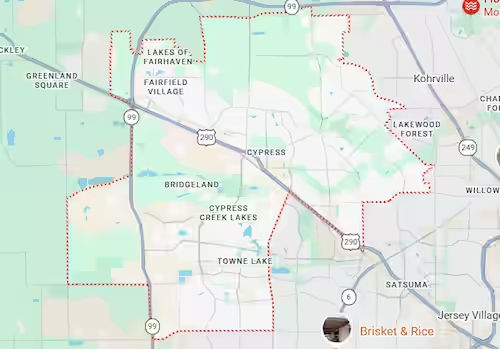
Harry Repairs provides in-store and mobile data recovery Cypress TX service throughout every Cypress TX neighborhood. This includes Bridgeland, Towne Lake, Fairfield, Longwood, BlackHorse Ranch, Copper Lakes, Stonegate, and all surrounding communities across zip codes 77429 and 77433. Every Cypress TX address falls within the mobile service area at no extra charge.
If your Cypress TX data loss was caused by ransomware or malware encrypting your files, visit Virus Removal Cypress TX for combined infection removal and file recovery in a single visit.
If your Cypress TX data loss originated from a physically damaged laptop rather than a standalone external drive, visit Laptop Repair Cypress TX for combined hardware repair and data recovery service.
Frequently Asked Questions
My external drive with client photos stopped being recognized. Can you recover them?
Harry Repairs recovers files from unrecognized external drives the same day in most logical failure cases. Call (346) 367-5911 immediately. Do not run any recovery software on your drive first. The sooner your drive reaches Harry Repairs, the higher your recovery success rate for professional archives.
How long does data recovery take in Cypress TX?
Your logical failure, including unrecognised drives, corrupted file systems, and accidentally deleted files, typically completes within 24 to 72 hours. Electronic and mechanical failures take longer depending on severity. Harry Repairs always gives you a realistic timeline after the initial assessment. Call (346) 367-5911 to discuss urgency and same-day options.
My drive was in my office during a Cypress TX flood. Can you still recover it?
Many flood-damaged drives are still recoverable, especially when corrosion has not yet spread to the platters. Speed is critical for your situation. Call (346) 367-5911 immediately after flood exposure. Do not attempt to dry your drive or power it on before calling. The sooner your flood-affected storage reaches Harry Repairs, the better your recovery outcome.
Do you charge if my data cannot be recovered?
Harry Repairs only charges for successful recoveries. If your files cannot be retrieved, you do not pay a recovery fee. You always receive an honest assessment of your recovery likelihood before any paid work begins. There are no surprise charges at the end of a failed recovery attempt.
Can you recover my NAS drive from my Bridgeland home office?
Harry Repairs recovers data from NAS devices used in Cypress TX home offices. This includes single-drive and multi-drive NAS configurations from Synology, Western Digital, Seagate, and all major brands. For your NAS with multiple failing drives, mobile service is recommended to avoid transit damage. Call (346) 367-5911 to discuss your specific NAS setup.
I have a drive from the 2017 Harvey flooding. Is it too late to recover it?
It is not necessarily too late for your Harvey-era drive. The magnetic platters inside hard drives are more resilient than the surrounding electronics. Harry Repairs has recovered files from drives with extended flood exposure. Call (346) 367-5911 and bring your drive in for assessment. Many Harvey-era Cypress TX drives still contain recoverable data today.
My drive failed right after my power came back on after a storm. What happened?
Post-outage power restoration surges are a common cause of drive failure along the Cypress TX US-290 corridor. The restoration spike can exceed normal operating voltage significantly. Your SSD is particularly vulnerable because its electronic controller has no mechanical tolerance for voltage irregularity. Call (346) 367-5911 for same-day assessment. Do not attempt to power your drive on again.
Is weekend data recovery available in Cypress TX?
Harry Repairs operates 7 days a week from 10 AM to 8 PM. In-store assessment and mobile visits throughout Cypress TX are available on Saturdays and Sundays. Your professional archive loss or business file failure does not wait for Monday. Neither does data recovery Cypress TX service at Harry Repairs.
Get Fast Data Recovery in Cypress TX Today
Every hour after your drive fails increases your risk of permanent file loss. Corrosion advances inside your drive. Mechanical damage spreads further. Overwritten sectors cannot be recovered. Your client photos, your business records, your Harvey-era family memories, and your Cy-Fair ISD senior year files are recoverable right now. They may not be recoverable next week.
Harry Repairs delivers professional data recovery Cypress TX service today. Same-day assessment, transparent upfront pricing, and no charge if your files cannot be recovered. Complete data confidentiality is guaranteed. Mobile service comes directly to your Bridgeland or Towne Lake address. Do not wait.
Call (346) 367-5911 now.
Shop: 3934 Farm to Market 1960 Rd W, Houston, TX 77068
Open 7 days a week, 10 AM to 8 PM. Walk-ins always welcome.
Mobile data recovery available throughout all Cypress TX neighborhoods at no extra charge.