

Same-Day Computer Repair in Cypress TX — In-Store on FM 1960 or Mobile to Your Door
Call Us Now!
Your desktop goes dark at 8 AM in Bridgeland. You have a client presentation in two hours, your partner is on their own work call in the next room, and your home office has just come to a complete stop. This is the moment that Harry Repairs exists for. Professional computer repair Cypress TX service reaches you both in-store at the FM 1960 shop and through mobile visits directly to any Cypress TX home or business. Because waiting three days for a mail-in repair is not an option when your livelihood depends on that machine. Call (346) 367-5911 right now for same-day computer repair in Cypress TX.
For all 10 device repair services in Cypress TX, visit the Cypress TX Device Repair Hub.
What Customers Say About Our Computer Repair Services In Cypress TX


Why Cypress TX Computers Break Down More Than You Might Expect
Cypress TX is not a typical suburb when it comes to device stress. A combination of exceptional household income, dual home-office setups, one of the largest school districts in Texas, and an environment shaped by rapid construction and proximity to open water creates conditions that push computers harder and wear them faster than most manufacturers anticipate.
Dual Home-Office Households Push Entire Networks to Breaking Point
Cypress TX households run at some of the highest professional income levels in Greater Houston, with many homes supporting two adults working remotely at the same time from separate home offices. When both parents are on simultaneous video calls, uploading large files, and running cloud-based business software across the same network, routers consequently overheat, network adapters in older computers start dropping connections, and machines that handled light use without complaint begin failing under sustained professional load. Harry Repairs sees this pattern specifically and regularly in Bridgeland and Towne Lake households where two high-demand careers are running simultaneously under one roof and when one computer fails, the entire household work structure breaks down immediately. That is why same-day repair matters so much in Cypress TX.
US-290 Power Infrastructure Makes Cypress TX Computers Vulnerable During Storm Season
The US-290 corridor running through Cypress TX relies heavily on overhead power infrastructure that is directly exposed to the severe thunderstorms and hurricane-related weather that moves through this area every summer. Unlike more established Houston neighborhoods with underground utility lines, much of Cypress TX’s newer residential and commercial development is served by above-ground power lines that transmit voltage spikes directly into homes when storm damage causes surges or interrupted restoration. A surge event along the US-290 corridor can destroy a computer’s motherboard, burn out the power supply, and corrupt the hard drive simultaneously often without a single external sign of damage. Furthermore, many Cypress TX residents never connect a computer failure to a storm that happened days earlier, because the damage sometimes manifests gradually rather than all at once.
Cypress TX’s Construction Activity Creates Dust That Destroys Computer Internals
Cypress TX is developing at one of the fastest rates in the United States with master-planned residential communities, new commercial strips, and infrastructure projects running simultaneously across 77429 and 77433. The fine construction particulate generated by this activity behaves differently inside computers than ordinary household dust. It is denser, more adhesive, and more abrasive than regular household dust. Consequently, it builds up on CPU heat sinks and graphics card fans faster than standard dust, causes fans to fail sooner, and creates a thermal insulating layer that accelerates overheating in machines that are running heavy professional workloads all day. As a result, Cypress TX residents in homes adjacent to active construction find their computers developing thermal problems significantly earlier than the same hardware would in a more established, dust-stable environment.
Bridgeland and Towne Lake Homes Experience Condensation Damage From Extreme Temperature Differentials
Bridgeland and Towne Lake are built around extensive man-made lakes and waterways that raise the ambient humidity in homes close to the water. When a Cypress TX resident carries a laptop or moves a desktop tower from an air-conditioned room to a warmer garage workspace or simply opens a window during an evening breeze off the lake the temperature differential causes condensation to form on internal components. As a result, motherboard traces corrode, capacitors fail prematurely, and power supply components develop intermittent faults that are difficult to diagnose without knowing the environmental history of the machine. Harry Repairs identifies these environmentally-caused failures accurately, in part because the technicians understand the specific conditions Cypress TX homes create.
Common Computer Problems Harry Repairs Fixes in Cypress TX
Computer That Won’t Turn On
Your computer refusing to power on is one of the most alarming problems you can face. Especially in a Cypress TX dual home-office household where a second adult is depending on the network functioning normally while you try to diagnose the issue. The cause is rarely obvious from the outside. A failed power supply is the most common culprit. However, surge damage from the US-290 corridor storm activity can also destroy the motherboard’s power delivery system, leaving a computer that appears completely dead even though the drive and memory are intact. Harry Repairs tests every component systematically to identify the exact failure point, which means your computer gets the right repair the first time rather than a parts-swapping exercise that wastes your time and money.
Slow or Completely Freezing Computer
Slow performance in Cypress TX computers almost always has a specific, fixable cause and the cause matters enormously because the wrong fix wastes time while the right one transforms the machine. In particular, a Cy-Fair ISD student whose computer freezes during an online exam needs a different solution from a Bridgeland professional whose machine slows to a crawl during video calls. Harry Repairs diagnoses the root cause accurately: a failing hard drive gets replaced with a fast SSD that improves boot times dramatically; a RAM module that is starting to fail gets replaced before it corrupts critical files; malware running silently in the background gets completely eliminated rather than partially removed. The result is a computer that performs as it should often better than it did when new.
Repeated Blue Screen Errors
Blue screen errors in Cypress TX computers are one of the most disruptive failures you can experience because they arrive without warning, shut down everything you are working on immediately, and often leave you unable to find the cause. Each blue screen carries an error code that points to a specific hardware or software failure. And furthermore, that code tells a trained technician exactly where to look. For example, a failing RAM module, a corrupted Windows driver, a hard drive with deteriorating sectors, or an overheating processor that is shutting down to protect itself. Harry Repairs reads these codes accurately and traces blue screens to their source rather than applying generic fixes that mask the problem temporarily. Because many Cypress TX computers develop these faults from the dust accumulation and thermal stress described above, addressing the environmental cause is as important as fixing the immediate error.
Virus and Malware Infections on Cypress TX Professional Computers
Cypress TX’s large population of high-earning professionals working from home makes the area a specific target for credential-stealing malware and business email compromise attacks. Healthcare workers near Memorial Hermann Cypress and Houston Methodist Cypress who work from home on computers that handle sensitive patient data face particularly serious consequences if those machines become infected. A virus on a HIPAA-adjacent home computer is not just an IT problem. It is a potential compliance event. Because of this, Harry Repairs treats these cases with particular care and urgency Harry Repairs eliminates virus and malware infections completely from Cypress TX computers, including the rootkits and fileless malware that standard antivirus tools miss, and configures real-time protection that keeps the machine secure after the cleanup.
Overheating and Thermal Shutdowns
Overheating is more common in Cypress TX computers than in many other Houston areas because of the specific combination of construction dust and sustained professional usage described earlier. Your computer’s cooling system can only perform as well as its physical condition allows. And in a Cypress TX home office where dust infiltration has been accelerating for months, the fans and heat sinks may be operating at a fraction of their designed capacity. Harry Repairs deep-cleans cooling systems, replaces degraded thermal paste between the processor and heat sink, and inspects fans for bearing wear, restoring your computer to the thermal performance it had when new. And preventing the gradual decline that leads to sudden thermal failure during critical work.
Hard Drive and SSD Failures
Storage failures in Cypress TX computers often arrive with warning signs that are easy to dismiss until they become urgent. A computer that takes longer to start each week, a folder that occasionally shows an error when accessed, an SSD that intermittently disappears from the drive list. These are the early signals of a failing storage device. Power surge events along the US-290 corridor are a particularly common cause of sudden SSD failure in Cypress TX, because the electronic controller inside a solid-state drive is extremely sensitive to voltage irregularities. Harry Repairs diagnoses storage health accurately, recovers data from failing drives before replacement where possible, and replaces failed storage with components that match the performance demands of your specific workflow.
Wi-Fi and Network Failures in Cypress TX Home Offices
Wi-Fi failures in Cypress TX home offices create a specific kind of disruption that affects both adults working remotely at the same time. When your computer drops the network connection during a video call, or connects at speeds that make cloud-based work impossible, the cause can be the computer’s wireless adapter, the router’s inability to handle simultaneous high-demand connections, or a driver incompatibility that appeared after a Windows update. Harry Repairs diagnoses network failures at the component level. Distinguishing between a hardware fault in the wireless adapter, a software issue in the network stack, and a router capacity problem that affects all devices in your home. And resolves the specific cause rather than recommending a network replacement that may not address the actual fault.
Safe Steps to Try Before Calling for Computer Repair in Cypress TX
These steps are safe to try and occasionally resolve problems without needing a technician. If none of them work, the problem needs professional diagnosis. Attempting further steps beyond these risks making some faults significantly worse.
When Your Computer Will Not Turn On
First, check that the power cable is firmly seated at both the wall outlet and the back of the computer. Try a different wall outlet entirely, bypassing any power strip or surge protector you normally use. If the computer still does not respond with a direct wall connection, first hold the power button for ten seconds to discharge any residual power, then try again. In this case, if nothing produces any response at all, the issue is internal and requires professional diagnosis at the Harry Repairs shop or through a mobile visit to your Cypress TX address.
When Your Computer Is Running Slowly
Open the Task Manager by pressing Control, Alt, and Delete together, then selecting Task Manager. Look at the Performance tab and check whether CPU, memory, or disk usage is consistently at 90% or above with no obvious programs running. If disk usage is permanently high, your hard drive may be failing. If memory is maxed out, closing unused applications and browser tabs will provide temporary relief but the underlying cause needs diagnosis. Restart the computer completely, not just sleep or hibernate and check whether performance improves after a full restart. If the slowness returns within an hour of restarting, the cause therefore requires professional diagnosis.
When Your Wi-Fi Keeps Dropping
Restart both your computer and your router, power off the router for 30 seconds before turning it back on. After both devices restart, test whether the connection is stable. If the dropping continues, however, check whether other devices in your Cypress TX home maintain a stable connection. If only your computer drops while other devices stay connected, the fault therefore lies in the computer’s network adapter or driver rather than the router. In this case, updating the network adapter driver through Device Manager is worth attempting first, right-click the Start button, select Device Manager, expand Network Adapters, right-click the wireless adapter, and select Update Driver. If the dropping continues after the update, the adapter needs professional diagnosis.
Our Computer Repair Process for Cypress TX Customers
Every computer repair Cypress TX job at Harry Repairs follows the same clear, transparent process, designed to give you confidence at every stage and eliminate any uncertainty about what is happening to your machine.
Step 1 Accurate Diagnosis Before Anything Else
The technician examines your computer thoroughly, testing the power system, storage health, memory integrity, thermal performance, and software environment to identify the actual root cause of the problem rather than the surface symptom. This step specifically protects you from paying for repairs that do not address the real issue, which is the most common failure of quick-fix computer repair services.
Step 2 Clear Explanation With Upfront Pricing
Before any work begins, the technician explains exactly what failed, what caused it, what the repair involves, and the full cost. You receive a transparent quote before the work starts. Not a surprise figure when you come to collect. So you can plan accordingly. There are no hidden fees added at the end and no charges for work that was not discussed before it was done.
Step 3 Professional Repair Using Quality Components
The technician completes your repair using high-quality replacement components appropriate for your specific computer model. Cheap parts fail again quickly. Consequently, Harry Repairs uses components that meet or exceed the original manufacturer’s specifications. Whether your computer needs a new power supply, a replacement SSD, a fresh application of thermal paste, or a complete virus removal and system hardening, the work uses parts chosen for long-term reliability.
Step 4 Full Testing Before Your Computer Leaves
After the repair, the technician runs your computer through comprehensive testing, including a full boot cycle, stress testing under load, network connectivity verification, and a final check of all repaired components under real operating conditions. Your computer only leaves the shop or the technician’s hands when it has passed every relevant test, not before. You are not collecting a machine that has been partially fixed and crossed fingers for.
Step 5 Warranty and Ongoing Support
Every computer repair Cypress TX job comes with a warranty on both parts and labor. If the same fault returns within the warranty period, Harry Repairs fixes it because the goal is a computer that stays fixed, not one that makes a return visit six weeks later. Additionally, the technician provides practical advice about protecting your specific Cypress TX setup from the environmental and usage factors most likely to cause the next failure.
In-Store and Mobile Computer Repair in Cypress TX
Drop Off at the FM 1960 Shop
The Harry Repairs shop is at 3934 Farm to Market 1960 Rd W, Houston, TX 77068, open 7 days a week from 10 AM to 8 PM. Walk-ins are always welcome without an appointment.
From Cypress TX, the shop is accessible via FM 1960 heading east from the Spring Cypress Road junction. Most Cypress TX neighborhoods reach the shop in 15 to 25 minutes depending on traffic. Drop your computer off before starting your workday and most repairs are ready for same-day collection before your afternoon sessions begin.
Mobile Computer Repair, A Technician Comes Directly to Your Cypress TX Address
For Cypress TX households where two adults are working from home simultaneously, mobile computer repair eliminates the disruption entirely. Rather than one person losing their work setup while the other carries on, a significant disruption in any household, a Harry Repairs technician comes directly to your Bridgeland or Towne Lake home office, diagnoses the problem on-site, and completes most repairs during the same visit. This means your workflow interruption is measured in hours rather than days, rather than the multi-day wait a mail-in service would require and neither person in your household has to coordinate transport of a desktop tower to a repair shop.
Mobile computer repair is also the practical choice for Cypress TX healthcare professionals whose work computers contain sensitive information that should not leave the home premises. It is equally valuable for residents who have recently moved into new Bridgeland or Towne Lake homes and have not yet established their local routines. Mobile service reaches every Cypress TX neighborhood at no extra charge. Call (346) 367-5911 to schedule same-day mobile computer repair in Cypress TX.
Computer Brands Harry Repairs Services in Cypress TX
Harry Repairs provides computer repair Cypress TX service for all major desktop and all-in-one computer brands used in Cypress TX homes and businesses. This includes Dell Inspiron, XPS, and OptiPlex desktops used extensively in Cypress TX home offices; HP Pavilion, ENVY, and EliteDesk systems; Lenovo IdeaCentre and ThinkCentre machines; Apple iMac and Mac mini for Cypress TX creative and medical professionals; Asus, Acer, and Samsung all-in-one systems; and custom-built gaming and workstation PCs used throughout Bridgeland and Towne Lake households. If your desktop or all-in-one brand is not listed, call (346) 367-5911 to confirm. Harry Repairs services virtually every computer available in Cypress TX.
For laptop repair in Cypress TX, visit Laptop Repair Cypress TX for dedicated portable device service covering screens, batteries, hinges, and liquid damage.
Cypress TX Neighborhoods Harry Repairs Serves for Computer Repair
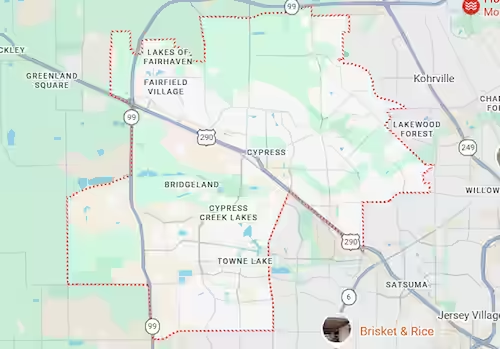
Harry Repairs provides in-store and mobile computer repair Cypress TX service throughout all Cypress TX neighborhoods including Bridgeland, Towne Lake, Fairfield, Longwood, BlackHorse Ranch, Copper Lakes, Stonegate, and all residential and commercial locations along the US-290 corridor, Barker-Cypress Road, Spring Cypress Road, and Cypress Creek Parkway. Every Cypress TX address in zip codes 77429 and 77433 falls within the Harry Repairs mobile service area at no extra charge.
Frequently Asked Questions, Computer Repair Cypress TX
How quickly can computer repair Cypress TX service fix my machine?
Harry Repairs prioritizes same-day computer repair for Cypress TX customers. Call (346) 367-5911 as early as possible to confirm same-day availability, either for an in-store drop-off at the FM 1960 shop or a mobile visit directly to your Cypress TX address. Most computer repairs complete the same day the device comes in.
Can you come to my home office in Bridgeland or Towne Lake for computer repair?
Absolutely. Harry Repairs sends technicians to every Cypress TX neighborhood for on-site computer repair, including Bridgeland, Towne Lake, Fairfield, BlackHorse Ranch, and all surrounding communities. Mobile service carries no extra charge. Call (346) 367-5911 to schedule a same-day visit.
Both computers in my home office are having problems. Can you fix both in one visit?
Yes. Harry Repairs mobile visits to Cypress TX can address multiple computers in the same household during a single call. This is especially valuable in dual home-office households in Bridgeland and Towne Lake where both adults work remotely and cannot afford extended downtime on either machine. Call (346) 367-5911 and explain the situation. The technician arrives prepared for both repairs.
How much does computer repair cost in Cypress TX?
Harry Repairs provides a transparent upfront quote after diagnosing your specific computer and fault, before any work begins. You know the full cost before the repair starts, with no hidden fees added afterwards. Call (346) 367-5911 or bring the device in for a same-day assessment.
My computer was fine before last night’s storm, is it worth repairing?
In most cases, yes. Storm-related computer failures along the US-290 corridor in Cypress TX are typically caused by power surge damage to the power supply or motherboard components that can be replaced without losing your data or replacing the entire machine. Call (346) 367-5911 for same-day diagnosis before writing the computer off.
What computer brands do you repair in Cypress TX?
Harry Repairs services all major brands including Dell, HP, Lenovo, Apple iMac, Asus, Acer, Samsung, and all custom-built desktops. Both Windows and macOS systems are covered. If your brand is not listed, call (346) 367-5911 to confirm availability.
Can you repair my computer without me losing my files?
In the vast majority of repairs, your files remain completely intact. Harry Repairs always assesses data safety during the initial diagnostic and advises you on any risk to your data before work begins. If a storage replacement is needed, Harry Repairs recovers your files to the new drive where the original storage is still readable.
Is computer repair Cypress TX service available on weekends?
Yes. Harry Repairs operates 7 days a week from 10 AM to 8 PM. In-store walk-ins and mobile visits to Cypress TX are both available on Saturdays and Sundays because a computer that fails on Friday afternoon cannot wait until Monday morning when your work week depends on it.
Get Fast Computer Repair in Cypress TX Today
Your computer going down in Cypress TX is not just an inconvenience, it is a work stoppage that costs you real time and real money. Whether your desktop needs same-day in-store service at the FM 1960 shop or a mobile technician arriving directly at your Bridgeland or Towne Lake home office, Harry Repairs delivers professional computer repair Cypress TX service with a transparent upfront quote, no hidden fees, quality parts, and a warranty on every repair. Do not wait for a small problem to become a large one.
Call (346) 367-5911 now.
Shop: 3934 Farm to Market 1960 Rd W, Houston, TX 77068
Open 7 days a week, 10 AM to 8 PM. Walk-ins always welcome.
Mobile service available throughout all Cypress TX neighborhoods at no extra charge.