

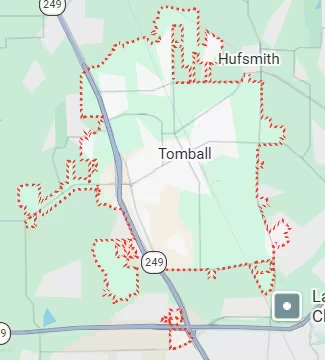
Same-day printer repair Tomball TX for all brands and all failure types. In-store at the FM 1960 shop or mobile directly to your Tomball address.
- Printer not printing at all: whether your printer shows no response or produces blank pages, same-day diagnosis identifies the exact cause and resolves it today
- Paper jams that keep coming back: recurring paper jams in Tomball TX are often caused by adhesive agricultural pollen bonded to feed rollers, not loose dust. Standard self-cleaning does not fix this
- Printer offline after a power event or router update: Tomball’s older home network configurations create specific offline patterns that differ from newer suburb printer issues
- Blank pages despite full ink or toner: dried inkjet nozzles after idle periods and clogged laser toner pathways both produce this symptom, each requiring a different fix
- Streaks, lines, or faded output: print head damage, worn drum unit, or depleted fuser components depending on your printer type
- Error codes that will not clear: including false paper jam errors and sensor faults that appear after winter power events in Tomball TX
- Printer working but printing incorrectly: intermittent failures from circuit board stress that cause random errors mid-job rather than complete failure
Most printer repair Tomball TX cases complete the same day. Call (346) 367-5911 right now.
For all 10 device repair services in Tomball TX, visit the Tomball TX Device Repair Hub.
What Customers Say About Our Printer Repair Services In Tomball TX
Why Tomball TX Printers Break Down in Ways Other Houston Suburbs Do Not See
Printer failures in Tomball TX have specific causes rooted in the community’s energy sector workforce, its agricultural geography, its older building stock, and its historic downtown commercial corridor.
Oil and Gas Regulatory Printing Has Zero Tolerance for Failure
Tomball’s energy sector professionals produce printed documentation that has regulatory and legal significance. Safety reports, well documentation, compliance filings, and field survey printouts for submission to corporate offices and regulatory bodies require hard copies in many oil and gas workflows. Your employer’s safety management system may specify physical documentation that cannot be replaced with a digital file.
When your printer fails on a Wednesday morning with a regulatory submission due that afternoon, the consequence is not a missed meeting. It is a delayed compliance filing with potential reporting implications. Harry Repairs handles same-day printer repair for Tomball’s energy sector professionals with this urgency understood. Call (346) 367-5911 when your printer fails before a compliance deadline. The technician arrives at your SH-249 corridor home office or your energy sector workplace with the tools to resolve the most common inkjet and laser printer failures the same day.
Agricultural Pollen Bonds to Feed Rollers in a Way Construction Dust Does Not
Tomball sits at the edge of agricultural Harris County farmland. During spring and early summer, your printer accumulates seasonal agricultural pollen at rates that more urbanised suburbs never experience. Pollen behaves differently from household dust or construction debris because it is adhesive. It bonds chemically to the rubber surfaces of your printer’s paper feed rollers and paper pick-up mechanisms rather than sitting loosely inside the machine.
The result is a recurring paper jam pattern specific to Tomball TX. Your printer jams at the point where the feed roller grips the paper. You clear the jam. It returns within days. Standard compressed air does not resolve it because the pollen is bonded to the rubber, not floating freely. Furthermore, bonded pollen causes multiple-sheet feeding because the roller loses its grip differentiation. Harry Repairs cleans Tomball TX feed rollers using professional methods that remove adhesive pollen buildup correctly. After seasonal cleaning, the jam pattern stops recurring until the following pollen season.
Older Tomball Home Networks Create Printer Offline Issues That Newer Suburbs Do Not Face
Tomball’s median home construction year is 1994. Many established Tomball households run printers on older routers that receive infrequent or automatic firmware updates. When an older router’s firmware updates automatically overnight, the printer’s stored Wi-Fi credentials and network configuration can become incompatible with the updated router settings. Your printer shows offline permanently the next morning with no obvious cause.
This specific offline pattern is different from the new-home mesh network disconnection issues seen in newer Houston suburbs. Specifically, the fix involves re-registering the printer on the updated network rather than troubleshooting the mesh configuration. Harry Repairs diagnoses this pattern regularly from Tomball TX customers in established properties and resolves it as part of the same-day service visit. If your Tomball TX printer suddenly shows permanently offline without any obvious triggering event, a router firmware compatibility issue is the first thing to check.
Tomball ISD Dual Credit Students Face Two Sets of Print Deadlines Simultaneously
Tomball ISD’s dual credit programme with Lone Star College Tomball means your student submits printed documentation to two separate institutions. Scholarship applications, FAFSA financial aid documentation, Lone Star College portfolio submissions, and Tomball ISD dual enrolment paperwork may all have hard-copy requirements on overlapping deadlines.
When your printer fails the evening before a scholarship application is due, your student faces a crisis that has real financial consequences, not just a late assignment. Harry Repairs handles same-day printer repair for Tomball ISD families with dual credit students because this printing urgency is genuinely higher than a standard homework deadline. If your student’s laptop also needs attention alongside the printer, Laptop Repair Tomball TX handles same-day screen, battery, and keyboard repairs so your student does not need two separate service visits. Call (346) 367-5911 immediately when your printer fails before a scholarship or financial aid print deadline.
Main Street Tomball Businesses Cannot Process Transactions Without a Working Printer
The historic businesses along FM 2920 in downtown Tomball, including antique dealers, specialty retailers, local restaurants, and professional offices near the Tomball Depot, depend on older HP LaserJet and Brother laser printers for invoices, receipts, order documentation, and menus. Many of these machines have run continuously for five to ten years with minimal servicing.
When your Main Street printer fails during trading hours, your ability to produce customer receipts or order paperwork stops immediately. Every customer transaction that requires a printed document is affected. Harry Repairs provides emergency same-day mobile printer repair throughout Tomball’s FM 2920 corridor. A technician comes directly to your Main Street address so your business stays open during the repair. Call (346) 367-5911 the moment your business printer shows any sign of failure.
Winter Storm Uri Left Tomball TX Printers With Intermittent Faults That Still Affect Them
The extended power outages along the SH-249 corridor during Winter Storm Uri in February 2021 created a printer failure pattern that many Tomball residents did not connect to the weather event. Unlike summer surge events that typically cause complete printer failure, extended cold followed by sudden full-voltage power restoration causes stress on printer circuit board components, specifically capacitors and paper detection sensors, producing intermittent rather than complete failure.
Your printer appears to work normally. Then it stops mid-job with a random error code. Or it shows a paper jam error when there is no jam. Sometimes it prints one page correctly and the next with missing sections. These random, inconsistent faults are the specific signature of cold-stress circuit damage and are particularly common from Tomball TX customers with established homes on the SH-249 corridor. If your printer developed intermittent problems after any winter power event, Harry Repairs diagnoses and repairs circuit-level faults the same day at the FM 1960 shop. For complex circuit board repairs, a brief turnaround at the shop is more effective than a mobile visit.
Common Printer Problems Harry Repairs Fixes in Tomball TX
Printer Not Printing. Any Cause, Same Day.
Your printer receives the job from your computer but produces nothing. The cause may be a driver conflict on your Windows or macOS system, a clogged inkjet nozzle array, a depleted laser toner path, a failed print head, or a wireless communication breakdown between your printer and your Tomball TX home network. Harry Repairs diagnoses the actual cause rather than defaulting to a driver reinstall that leaves the hardware fault unaddressed.
If your printer is connected to a computer that also has performance or connectivity issues, visit Computer Repair Tomball TX for combined computer and printer service in a single visit rather than booking two separate appointments.
Paper Jams Including Recurring Tomball-Specific Pollen Jams
Paper jams in Tomball TX have two distinct causes that require different approaches. Standard jams from worn feed rollers, torn paper fragments caught in the paper path, or ink cartridge misalignment are resolved through standard cleaning and component inspection. Recurring pollen-adhesive jams from Tomball’s agricultural pollen season require professional roller cleaning using methods that remove the bonded material correctly.
Do not continue forcing paper through a jammed printer. Each forced attempt risks tearing paper fragments into the paper path, scoring the rollers, or damaging the fuser assembly, all of which significantly increase repair cost and complexity. Call (346) 367-5911 for same-day assessment if your paper jams return repeatedly after your own clearing attempts.
Printer Permanently Offline
Your printer is connected and powered but shows offline on every device in your Tomball TX home or office. The three most common causes Harry Repairs sees from Tomball TX customers are: an older router firmware update that invalidated the printer’s stored credentials, a failed wireless card inside the printer itself, or a corrupted printer spooler on the connected computer. Each cause has a different fix. Harry Repairs diagnoses which issue is present before recommending any solution.
Blank Pages Despite Full Ink or Toner
An inkjet printer producing blank pages typically has clogged print head nozzles from a period of disuse. Ink dries inside the nozzle array when a printer sits unused for weeks in Tomball TX’s heat and humidity cycles. A laser printer producing blank pages typically has a depleted toner cartridge, a failed drum unit, or a high-voltage power supply fault that prevents toner transfer. The symptom looks identical from the outside. However, the fix is completely different. Harry Repairs identifies which type of failure is present from the diagnostic before any parts are ordered or replaced.
Streaks, Lines, Smearing, or Faded Output
Print quality failures in Tomball TX have printer-type-specific causes. Inkjet streaks come from partially blocked nozzles or a print head that needs professional cleaning beyond what the printer’s built-in cleaning cycle achieves. Laser printer streaks typically indicate a worn or scratched drum unit, contaminated toner cartridge, or a failing fuser roller that is not melting the toner properly onto the page. Smearing on laser output specifically indicates a fuser fault and means the printer should not be used further until repaired. Continued use worsens the fuser damage significantly.
Safe Steps to Try Before Calling for Printer Repair in Tomball TX
When Your Printer Will Not Print
First, restart your printer completely by powering it off at the button, waiting 30 seconds, and powering it back on. Then restart your computer. Many driver communication failures resolve with a full restart of both devices. If the printer still does not respond after a full restart of both devices, check your print queue. Open your computer’s print queue and look for jobs stuck with error status. Cancel all stuck jobs, then try printing a test page directly from the printer’s own menu rather than from your computer.
If none of these steps produce output, the fault is hardware-level rather than software-level. Call (346) 367-5911 for same-day printer repair Tomball TX service.
When Your Printer Shows Offline
First, check whether your printer’s wireless indicator light is showing a connected status. If it is not connected, run the printer’s own wireless setup wizard from its control panel rather than from your computer. When the wireless setup finds your network but the printer still shows offline on your computer, the issue is likely a driver conflict on the computer side rather than a printer hardware fault. Try removing the printer from your computer’s device list entirely and adding it fresh.
If your Tomball TX home router received a recent firmware update and the printer was online before that update, this is the older-home network compatibility issue described above. Call (346) 367-5911 for a same-day network reconfiguration visit.
When Your Laser Printer Produces Streaks or Grey Patches
First, check whether your toner cartridge has reached its page count limit. Most laser printers display a toner level warning before output quality degrades. If toner is above 10%, the cause is not toner depletion. Do not continue running a laser printer that is producing heavy grey streaks or smearing. This indicates a fuser fault that worsens with each subsequent page printed. Stop printing and call (346) 367-5911 immediately.
Our Printer Repair Process for Tomball TX Customers
Every printer repair Tomball TX case at Harry Repairs follows the same structured process.
Step 1. Full Diagnosis at the FM 1960 Shop or Your Tomball TX Address
The technician runs a complete assessment covering hardware condition, network configuration, driver status, and print quality output. For Tomball’s energy sector professionals and Main Street business owners, the technician also confirms whether the printer’s job queue and settings are correctly configured for the specific document types your work requires. You receive an honest assessment of the fault and a clear quote before any repair work begins.
Step 2. Clear Quote Before Any Work Starts
Your quoted price is what you pay at collection. No additional charges appear afterwards. If your printer’s repair cost does not make financial sense compared to a replacement, you receive that honest assessment before any paid work begins. Harry Repairs does not start work without your explicit approval of the full cost.
Step 3. Professional Repair With Quality Components
The technician uses replacement components specified for your exact printer model. A fuser assembly for your HP LaserJet requires different specifications from a fuser for your Brother laser printer. An inkjet print head replacement requires the correct part for your specific model to maintain output quality. Harry Repairs sources parts correctly rather than using generic alternatives that degrade faster under Tomball TX’s operating conditions.
Step 4. Full Print Test and Network Verification Before Return
After every repair, your printer is tested through a full print cycle including text, graphics, and a network connectivity test from at least one device. For Tomball TX energy sector professionals, the test includes a multi-page document that represents your typical regulatory printing workload. The printer leaves the shop or the technician’s hands only when every test passes completely.
Step 5. Warranty and Ongoing Support
Every Harry Repairs printer repair carries a warranty on parts and labour. If the same fault returns within the warranty period, Harry Repairs addresses it without additional charge. Guidance on printer maintenance specific to Tomball TX is also provided, including the seasonal pollen cleaning schedule that prevents recurring feed roller jams from rebuilding year after year.
In-Store and Mobile Printer Repair in Tomball TX
Drop Off at the FM 1960 Shop
The Harry Repairs shop is at 3934 Farm to Market 1960 Rd W, Houston, TX 77068, open 7 days a week from 10 AM to 8 PM. From central Tomball, the shop is approximately 10 to 15 minutes via SH-249 South to FM 1960. Walk-ins are always welcome. Most Tomball TX printer repairs complete the same day. Bring the printer itself for in-store repairs. Do not bring the computer unless both devices need service simultaneously.
Mobile Printer Repair at Your Tomball TX Address
Mobile printer repair is the right choice when your printer is a larger office or commercial machine that cannot be easily transported, when your Main Street Tomball business cannot close for a printer drop-off run, or when network reconfiguration requires testing on your actual home network rather than a test environment at the shop. Harry Repairs sends a technician directly to your Tomball TX address at no extra charge. Mobile service covers all communities across the 77375 and 77377 zip codes. Call (346) 367-5911 to confirm same-day availability for your specific address.
Printer Brands Harry Repairs Services in Tomball TX
Harry Repairs provides printer repair Tomball TX service for all major brands used across Tomball TX homes, businesses, and professional workplaces. These include:
- HP: DeskJet, OfficeJet, LaserJet, HP Envy, HP Color LaserJet, and all HP printer series including the older HP LaserJet models common in Tomball’s Main Street businesses
- Canon: PIXMA, MAXIFY, imageCLASS, and all Canon inkjet and laser printer ranges
- Brother: MFC all-in-one, HL laser, DCP multifunction, and all Brother printer series used in Tomball TX home offices and commercial properties
- Epson: EcoTank, Expression, WorkForce, and all Epson inkjet and laser series
- Samsung and Xerox laser printers used in Tomball TX professional and commercial settings
- Lexmark, Kyocera, and all commercial laser printer brands used by Tomball’s energy sector home offices and FM 2920 businesses
If your specific printer model is not listed, call (346) 367-5911 to confirm availability before your drive from Tomball to the FM 1960 shop.
Tomball TX Neighborhoods Harry Repairs Serves for Printer Repair
Harry Repairs provides in-store and mobile printer repair Tomball TX service throughout all Tomball communities. Mobile service covers Creek Falls at Country Lake, Amira, Wood Creek, Heritage Oak Park, and Becker’s Landing along Grand Parkway TX-99. Service also covers all established Tomball neighborhoods near the historic downtown FM 2920 corridor, the Tomball Depot area, Spring Creek neighborhoods, Willow Creek homes, Hufsmith, Pinehurst, and all Tomball TX streets across the 77375 and 77377 zip codes at no extra charge.
Frequently Asked Questions.
Why does my Tomball TX printer keep jamming even after I clear it?
Recurring paper jams in Tomball TX are most commonly caused by agricultural pollen bonded to your printer’s feed rollers. Unlike loose dust that compressed air removes, pollen bonds chemically to rubber roller surfaces and cannot be removed with standard cleaning methods. Harry Repairs cleans Tomball TX feed rollers professionally to remove the bonded pollen completely. Call (346) 367-5911 for same-day printer repair Tomball TX service if your jams keep returning.
My printer suddenly shows offline and nothing I try fixes it. What happened?
In established Tomball TX homes, a printer going permanently offline overnight without obvious cause is usually a router firmware compatibility issue. When older routers update their firmware automatically, the printer’s stored Wi-Fi credentials can become incompatible. Harry Repairs diagnoses and resolves this specific pattern the same day. Call (346) 367-5911 and describe when the offline issue started relative to any router changes.
Can you repair my printer for a regulatory compliance deadline today in Tomball TX?
Harry Repairs handles same-day printer repair for Tomball’s energy sector professionals with compliance printing deadlines. Call (346) 367-5911 early and explain the deadline when booking so the repair is prioritised correctly. Most inkjet and laser printer failures are resolved the same day at the FM 1960 shop or through a mobile visit to your SH-249 corridor home office.
My printer started producing random error codes and stopping mid-job after last winter. What is wrong?
Intermittent printer errors that began after a winter power event are a specific pattern Harry Repairs sees regularly from Tomball TX customers on the SH-249 corridor. Extended cold followed by sudden power restoration stresses capacitor and sensor circuits, producing random faults rather than complete failure. Harry Repairs diagnoses and repairs circuit-level faults the same day. Call (346) 367-5911 for a same-day assessment at the FM 1960 shop.
Can you come to my Main Street Tomball business to repair my printer today?
Harry Repairs provides emergency same-day mobile printer repair for businesses along the FM 2920 corridor. A technician comes directly to your Main Street address so your business stays open during the repair. Call (346) 367-5911 immediately when your commercial printer fails during trading hours. Most HP LaserJet and Brother laser printer faults are resolved in a single mobile visit.
Is weekend printer repair available in Tomball TX?
Harry Repairs operates 7 days a week from 10 AM to 8 PM. In-store walk-ins and mobile visits throughout Tomball TX are available on Saturdays and Sundays. A scholarship printing deadline does not fall only on weekdays. Neither does a regulatory submission or a business need. Call (346) 367-5911 any day of the week for same-day printer repair Tomball TX service.
How long does printer repair take in Tomball TX?
Most Tomball TX printer repairs complete within 1 to 3 hours at the FM 1960 shop. Paper jam clearing, print head cleaning, driver reinstallation, and network reconfiguration all typically complete within this window. More complex circuit board repairs or component replacements requiring ordered parts take longer. A realistic time estimate is always provided after the initial assessment so you can plan your Tomball TX day accordingly.
Is it worth repairing my Tomball TX printer or should I replace it?
Harry Repairs gives you an honest assessment before any paid work begins. As a general guide, if the repair cost is less than 50% of a comparable new printer’s price and the machine is less than five years old, repair is almost always the better choice. For Tomball’s Main Street commercial laser printers that have run continuously for years, repair is frequently more cost-effective than sourcing a comparable new machine at short notice. Call (346) 367-5911 for a free assessment quote before deciding.
Get Fast Printer Repair in Tomball TX Today
Your oil and gas compliance report needs printing today. That scholarship application has a hard-copy deadline tonight. Your Main Street business cannot process invoices. The printer jams on every sheet and you have tried everything. Every hour without a working printer costs you more than the repair itself.
Harry Repairs delivers professional printer repair Tomball TX service with same-day availability for all brands, honest upfront pricing, a warranty on every repair, and mobile visits directly to your FM 2920 corridor business, your SH-249 home office, your Creek Falls, Amira, Wood Creek, or any Tomball TX address.
Call (346) 367-5911 now.
Shop: 3934 Farm to Market 1960 Rd W, Houston, TX 77068
Open 7 days a week, 10 AM to 8 PM. Walk-ins always welcome.
Mobile printer repair available throughout all Tomball TX communities at no extra charge.