

Your workstation in your Creek Falls home office runs geological modelling software for your energy firm. It freezes mid-simulation on a Wednesday morning. Your SH-249 drive to the Energy Corridor takes 40 minutes. Driving in defeats the entire purpose of working from home. Professional computer repair Tomball TX service from Harry Repairs reaches your Tomball address the same day. In-store drop-off at the FM 1960 shop or a mobile technician at your door. Call (346) 367-5911 right now.
For all 10 device repair services in Tomball TX, visit the Tomball TX Device Repair Hub.
What Customers Say About Our Computer Repair Services In Tomball TX
Why Tomball TX Computers Break Down in Ways You Did Not Expect
Computer repair Tomball TX cases have failure patterns that are specific to this community. Your energy sector workstation faces different stress from your student’s home computer. Your Main Street business machine faces different stress again. None of these match patterns from other Houston suburbs.
Energy Sector Workstations Face a Different Kind of Thermal Stress
Tomball’s oil and gas professional workforce runs some of the most demanding desktop software in any Houston suburb. Your geological modelling, seismic interpretation, and reservoir simulation programs sustain CPU and GPU loads for hours. They do not pause. Neither does the heat they generate. This is not the occasional video call or browser tab that most home computers handle.
Sustained computational work generates heat continuously. Your processor throttles its speed when thermal limits are reached. Your computer slows down during the exact calculation that took three hours to reach. Your GPU fan strains to compensate. Over weeks, thermal stress compounds into hardware failures that standard diagnostics attribute to normal wear without identifying the real workload cause. Harry Repairs identifies this specific pattern in Tomball TX energy sector workstations. The cooling system, thermal compound, and component health are all addressed in the same visit.
Tomball’s Agricultural Pollen Damages Computer Internals Differently From Construction Dust
Tomball sits at the edge of Harris County’s agricultural land. Your computer accumulates seasonal agricultural pollen at a rate that more urbanised suburbs do not experience. Pollen is fundamentally different from construction dust. It is adhesive. It bonds to CPU heatsink fins and GPU cooling surfaces rather than simply settling loosely inside the case.
Additionally, pollen holds moisture against the metal surfaces it coats. A pollen layer inside your heatsink retains atmospheric humidity continuously. Over one Tomball pollen season, this creates a compressed insulating layer that standard compressed air cannot dislodge. Consequently, your heatsink loses its ability to transfer heat efficiently. Your computer then overheats under loads it handled easily before. Harry Repairs removes this accumulation using professional cleaning methods. Compressed air alone pushes pollen deeper into the fins.
SH-249 Power Events Create a Specific Winter Failure Pattern in Tomball
SH-249 connects Tomball to power infrastructure at the edge of development. Extended outages along the Tomball Parkway corridor create a different failure pattern. Your computer faces different stress from a brief summer surge. Extended outages expose your computer’s power supply and capacitors to sustained cold. Your components contract. Then power restoration arrives suddenly at full voltage.
The combination of extended cold exposure followed by abrupt power restoration creates stress on capacitors specifically. Your power supply may function normally for days. Then a stressed capacitor causes sudden shutdown or instability. The connection to the power event is not obvious. Therefore, if your computer behaves erratically after any Tomball power event, the cause may be inside the power supply. This applies even if the computer still turns on. Harry Repairs diagnoses this pattern accurately rather than replacing components that did not cause the failure.
Older Tomball Homes Were Not Wired for Modern Computer Workloads
Tomball’s median home construction year is 1994. Your established Tomball property was wired before the modern home office existed. Energy sector professionals now run dual monitors, external drives, and enterprise workstations from a single circuit. Voltage irregularities under this load create a gradual damage pattern across your connected hardware. Your SSD controller degrades faster than normal. Your motherboard develops intermittent faults that are difficult to reproduce during standard diagnostics.
Harry Repairs identifies this electrical load pattern from Tomball TX customers in established properties regularly. The technician assesses your connected hardware and identifies which components were affected. You receive specific outlet configuration advice for your Tomball TX home office setup.
Common Computer Problems Harry Repairs Fixes in Tomball TX
Workstation Freezing or Crashing Under Heavy Software Load
Your energy sector or professional workstation functions normally during light tasks. It freezes, blue-screens, or shuts down when running intensive software. This is the most specific computer repair Tomball TX pattern Harry Repairs handles. It comes from SH-249 corridor and Grand Parkway community professionals regularly. The cause is almost always thermal throttling from a clogged or degraded cooling system rather than a software fault.
The technician cleans your CPU heatsink and replaces dried thermal compound. GPU cooling function is verified. Your system runs under the same load conditions that caused the failure before return. Your computer must pass the stress test before the repair is considered complete.
Computer That Stopped Working After a Tomball Power Event
Your computer was working before the outage. Now it does not start, or it starts but behaves erratically. This is a power-related hardware failure from either a surge or an extended outage event. The damage is most commonly inside your power supply, and sometimes extends to your motherboard and storage controller. Your data is usually intact even when the computer cannot boot.
Harry Repairs diagnoses power-related failures for Tomball TX computers the same day. The technician tests each component systematically to identify what was damaged rather than replacing everything at once. Most post-outage Tomball TX computer repairs complete the same day because the failure pattern is specific and well-understood.
Computer Running Slowly After Tomball ISD Software Installation
Your student’s computer handled school work without complaint last year. This year it runs slowly after new Tomball ISD campus software was installed. New school applications, updated browser requirements, and stricter security settings all consume system resources on older hardware. Your student’s computer may simply be under-specified for the new software environment at their Tomball ISD campus.
Specifically, Harry Repairs optimises existing hardware for the new software load where possible. RAM upgrades, SSD replacements, and system cleanup extend the useful life of older computers significantly. Your student gets a faster machine without the cost of a full replacement.
Historic Downtown Tomball Business Computer Failure
Your Main Street point-of-sale system cannot process a transaction. Your FM 2920 corridor business runs legacy software that cannot simply be reinstalled from a browser. Your vendor is three states away. Your customers are waiting at the counter. This is a different kind of computer repair emergency from a home office failure.
Harry Repairs handles downtown Tomball small business computer emergencies with mobile same-day response. Legacy software dependencies and older hardware configurations require careful handling. A standard refresh destroys the software environment your business depends on. Call (346) 367-5911 immediately when your Tomball business computer stops working during trading hours.
Overheating Gaming PC or High-Performance Desktop
Your gaming PC or high-performance desktop in Tomball shuts down unexpectedly during gameplay or intensive tasks. The thermal shutdown protection triggers before permanent damage occurs. However, repeated thermal shutdowns without addressing the cause damage your hardware gradually. Pollen accumulation is a specific and frequent cause in Tomball TX gaming PCs. It requires more than a can of compressed air to resolve properly.
Harry Repairs cleans your gaming PC’s cooling system thoroughly and replaces thermal paste on CPU and GPU. All case fans are verified after the service. Your system is stress-tested before the repair is confirmed complete.
Safe Steps to Try Before Calling for Computer Repair in Tomball TX
Try these steps first. If none of them resolve the problem, call (346) 367-5911 for same-day computer repair Tomball TX service. Going further without professional diagnosis risks making the underlying fault significantly worse.
When Your Computer Freezes or Crashes Under Load
First, check whether the freezing happens only during specific software or always. If it only happens during heavy applications, the cause is almost certainly thermal. Open your computer’s case and look at the CPU heatsink. If you can see dust or pollen on the heatsink fins, try careful cleaning with compressed air from a distance. Never press the can directly against components. Never use a vacuum directly against components.
If the fins have a yellowish sticky coating rather than loose grey dust, the accumulation is pollen-based. Compressed air alone will not solve it. Professional cleaning is needed. Call (346) 367-5911 at that point. Forcing compressed air harder against a pollen-coated heatsink compacts the layer and makes the problem worse rather than better.
When Your Computer Will Not Start After a Power Event
Power off your computer completely at the wall socket. Wait 60 seconds. Reconnect and attempt to start. If your computer starts but behaves erratically or shuts down again quickly, the power supply has sustained damage. Do not continue using a computer with a damaged power supply. Each restart attempt stresses damaged components further.
If your computer does not start at all, do not attempt to diagnose inside the case without proper discharge procedures. A power supply retains charge even when unplugged. Call (346) 367-5911 for same-day assessment. Most post-outage Tomball TX computer failures are resolved the same day.
When Your Computer Runs Slowly After New Software Installation
First, restart your computer fully rather than using sleep mode. A full restart clears temporary files and reinitialises system resources. If slowness continues after restarting, check how much RAM your new software requires compared to what your computer has. Look in your computer’s Task Manager for which application is consuming the most resources.
If your RAM usage sits above 85% during normal operation, an upgrade is needed. Either RAM or an SSD upgrade handles the new Tomball ISD software environment. Both are same-day repairs at the FM 1960 shop. Call (346) 367-5911 to confirm same-day mobile service availability.
Our Computer Repair Process for Tomball TX Customers
Every computer repair Tomball TX case follows a clear process at Harry Repairs. You know exactly what is wrong before any work begins. You know the full cost before it starts.
Step 1. Accurate Diagnosis That Finds the Real Cause
Your computer goes through a full diagnostic sequence at the FM 1960 shop. Mobile visits to your Tomball TX address follow the same sequence. This covers power supply output and CPU and GPU thermal performance under load. Storage drive health, RAM integrity, and software environment are also assessed. Specifically, Tomball energy sector workstations are tested under the same computational load that caused the failure. Testing at idle only misses the real failure condition.
The goal is the actual cause of your problem, not the surface symptom. Treating a thermal failure as a software issue is the most common and costly diagnostic mistake in computer repair. Harry Repairs identifies the root cause first.
Step 2. Clear Explanation and Honest Quote Before Any Work Starts
Before touching your computer further, the technician explains exactly what failed. The Tomball TX context of the failure is part of that explanation. The full cost is confirmed before any work begins. Your quoted price is the price you pay. No additional charges appear at collection. Furthermore, if repair cost does not make financial sense for your machine, you are told that honestly. No paid work begins until you have that information.
Step 3. Professional Repair With Quality Components
The technician completes your repair using components chosen for your specific computer model and use case. Energy sector workstations handling sustained computational loads need cooling components rated for those loads. A standard retail heatsink replacement on a professional workstation creates the same problem within months. Harry Repairs specifies components correctly for your actual Tomball TX usage pattern.
Step 4. Stress Testing Under Real-World Conditions
After every Tomball TX computer repair, your machine is tested under the same conditions that caused the failure. Your workstation runs stress tests that simulate the exact load from your geological modelling software. The test matches your real Tomball TX home office conditions. Your gaming PC runs extended GPU stress tests that match gameplay conditions. Your student’s computer runs its new school software environment through a full session.
Your computer only leaves the shop or the technician’s hands when it passes every test completely. This is the only approach that confirms the repair actually solved the problem.
Step 5. Guidance Specific to Your Tomball TX Setup
After every repair, the technician provides specific advice for your Tomball TX environment. This includes seasonal pollen cleaning intervals for your agricultural-area home. Power surge protection for your SH-249 corridor location is also covered. Workload management advice for energy sector setups is provided. The guidance addresses your specific situation rather than generic computer maintenance tips.
In-Store and Mobile Computer Repair for Tomball TX
Drop Off at the FM 1960 Shop
The Harry Repairs shop is at 3934 Farm to Market 1960 Rd W, Houston, TX 77068, open 7 days a week from 10 AM to 8 PM. From central Tomball, the shop is approximately 10 to 15 minutes via SH-249 South to FM 1960. Walk-ins are always welcome. Most Tomball TX computer repairs complete the same day.
Mobile Computer Repair at Your Tomball TX Address
Mobile service is the right choice for several Tomball TX computer situations. Your energy sector workstation with dual monitors and external storage should not be transported. Dismantling and rebuilding your setup wastes hours you do not have. Rebuilding your entire desk setup at the shop and then at home wastes hours. Mobile service eliminates this entirely. A technician comes to your Creek Falls, Amira, or Wood Creek home office directly.
Mobile service is also the right choice for your downtown Main Street business desktop that handles commercial transactions. Your business cannot close for half a day to transport a legacy point-of-sale computer. Harry Repairs brings same-day computer repair Tomball TX service directly to your FM 2920 corridor business address. Mobile service covers every Tomball TX address at no extra charge. Call (346) 367-5911 to confirm same-day availability.
Desktop and Computer Types Harry Repairs Services in Tomball TX
Harry Repairs provides computer repair Tomball TX service for all major desktop types used across the community. This includes Windows desktop PCs, all-in-one computers, Apple iMac and Mac Mini systems, and custom-built desktops. Gaming PCs and professional workstations from Dell, HP, Lenovo, Apple, Asus, and Acer are all covered. Legacy point-of-sale systems and older business computers used by Tomball’s Main Street businesses are also serviced. If your specific computer model is not listed, call (346) 367-5911 to confirm availability.
If your Tomball TX household also has a laptop needing attention, Laptop Repair Tomball TX covers same-day screen replacement, battery replacement, and all laptop repairs at the FM 1960 shop or mobile to your door.
Tomball TX Neighborhoods Harry Repairs Serves for Computer Repair
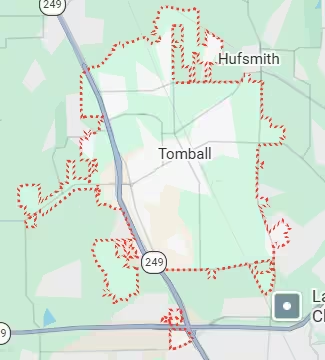
Harry Repairs provides in-store and mobile computer repair Tomball TX service throughout every Tomball community. This includes Creek Falls at Country Lake, Amira, Wood Creek, Heritage Oak Park, and Becker’s Landing along Grand Parkway TX-99. It also includes the historic downtown Main Street corridor, Spring Creek area neighborhoods, Willow Creek area homes, Hufsmith, Pinehurst, and the Hooks Airport area in eastern Tomball. Every address across the 77375 and 77377 zip codes is within the mobile service area at no extra charge.
Frequently Asked Questions.
Can you fix my energy sector workstation the same day in Tomball?
Harry Repairs handles same-day workstation repair for Tomball TX energy sector professionals at your home office address. Most workstation repairs involving cooling system failures, thermal compound replacement, and post-outage power supply issues complete the same day. Call (346) 367-5911 early and explain your workstation software environment when booking so the technician arrives fully prepared.
How long does computer repair take in Tomball TX?
Most Tomball TX computer repairs complete the same day at the FM 1960 shop. Cooling system repairs, RAM upgrades, SSD replacements, and post-outage power supply diagnostics all typically finish within two to four hours. More complex motherboard or data recovery work takes longer. Harry Repairs always gives you a realistic timeframe after the initial diagnostic before any work begins.
My computer stopped working after the power came back on. Can it be fixed?
Power restoration surge damage to Tomball TX computers is one of the most common post-storm repair cases Harry Repairs handles. In most cases, the power supply absorbed the damage and your data is still intact. Call (346) 367-5911 for same-day assessment. Do not attempt to restart your computer repeatedly after a power event, as each restart stresses the damaged components further.
My computer keeps overheating. Is it the pollen?
Pollen accumulation is a specific and common cause of overheating in Tomball TX computers, particularly after spring pollen season. Unlike ordinary dust, agricultural pollen bonds to heatsink surfaces and holds moisture. It requires professional cleaning rather than compressed air alone. Harry Repairs removes pollen accumulation correctly and tests your computer under full load before confirming the repair is complete.
Can you repair my Tomball ISD student’s computer today?
Harry Repairs handles same-day computer repair for Tomball ISD families. Whether your student’s computer runs slowly under new Tomball ISD software or has a hardware fault, most repairs complete the same day. Call (346) 367-5911 for same-day availability at the FM 1960 shop or through a mobile visit to your Tomball TX address.
Do you repair computers for Tomball Main Street businesses?
Harry Repairs provides same-day mobile computer repair for businesses along the FM 2920 corridor. Tomball’s historic Main Street businesses are covered. Legacy point-of-sale systems, older office computers, and business-critical desktop machines are all handled with the urgency commercial operations require. Call (346) 367-5911 immediately when your Tomball business computer stops working during trading hours.
Is weekend computer repair available in Tomball TX?
Harry Repairs operates 7 days a week from 10 AM to 8 PM. In-store walk-ins and mobile visits throughout Tomball TX are available on Saturdays and Sundays. Your workstation does not only fail on weekdays. Neither does your student’s computer or your Main Street business machine. Call (346) 367-5911 any day of the week for same-day Tomball TX computer repair.
What should I do if my computer fails during a critical work task?
Save any open files immediately if your screen is still responsive. Then power down the computer fully at the wall socket rather than using the power button alone. Note what you were running when the failure occurred. Call (346) 367-5911 right away. Same-day computer repair Tomball TX service is available and most work-critical failures are resolved the same day at your home address.
Get Fast Computer Repair in Tomball TX Today
Your workstation is down. Your energy sector calculation is paused. Your Tomball ISD student has a deadline. Your Main Street business cannot process a transaction. Every hour your computer stays broken has a direct cost.
Harry Repairs delivers professional computer repair Tomball TX service today. Same-day availability at the FM 1960 shop or mobile to Creek Falls, Amira, Wood Creek, or any Tomball TX address. Transparent upfront pricing. Quality components chosen for your specific use case. A warranty on every repair. And a technician who understands what Tomball TX computers face specifically. Do not wait.
Call (346) 367-5911 now.
Shop: 3934 Farm to Market 1960 Rd W, Houston, TX 77068
Open 7 days a week, 10 AM to 8 PM. Walk-ins always welcome.
Mobile computer repair available throughout all Tomball TX communities at no extra charge.