

Your medical practice on Cypress Creek Parkway has patients arriving at 9 AM. Your copier jammed yesterday and appeared to clear itself. This morning it shows an error code and will not produce a single patient intake form. Every minute that machine stays down, your front desk falls further behind. Professional copier repair Cypress TX service from Harry Repairs reaches your Cypress TX location the same day. Call (346) 367-5911 right now.
For all 10 device repair services in Cypress TX, visit the Cypress TX Device Repair Hub.
What Customers Say About Our Copier Repair Service In Cypress TX


Why Cypress TX Businesses Depend on Working Copiers Every Day
Commercial copiers are not peripheral office equipment in Cypress TX. They are the backbone of daily operations for medical practices and HOA offices. Real estate agencies, school administrative teams, and construction firms across Bridgeland, Towne Lake, and US-290 all depend on them equally. When your copier stops working, your business operations stop with it.
Cypress Creek Parkway Medical Practices Cannot Afford Copier Downtime
Cypress TX has one of the highest concentrations of medical offices in Northwest Houston. Specialist clinics, urgent care centres, and outpatient facilities line the Cypress Creek Parkway corridor. Your medical practice depends on your copier for HIPAA-compliant patient documentation, insurance claim forms, referral packets, and pre-authorisation paperwork. A copier failure in your Cypress Creek Parkway practice is not simply an inconvenience.
Your front desk cannot check patients in without intake forms. Your billing department cannot process claims without printed documentation. Your compliance obligations do not pause because your machine failed. Harry Repairs understands the urgency of medical office copier repair. Same-day on-site response for your Cypress TX practice is the standard, not the exception.
Bridgeland and Towne Lake HOA Management Offices Require Constant Copy Output
Bridgeland is one of the largest master-planned communities in the United States. Towne Lake, Fairfield, and BlackHorse Ranch each have their own active community management operations. Your HOA management office produces architectural review forms and deed restriction letters daily. Community event materials, resident notices, and board meeting documentation add to that constant output.
When your HOA office copier fails, your community operations function stops. Resident requests go unprocessed. Meeting materials cannot be prepared. Architectural review timelines slip. Harry Repairs handles HOA copier repair across all Cypress TX master-planned communities. The same urgency standard applies as any commercial client. Because your community deserves that response time.
Cypress TX Real Estate Transaction Volume Makes Copier Reliability Critical
ZIP code 77433 was the most moved-into community in the United States in 2025. Every real estate transaction in Cypress TX requires printed disclosure packets, inspection reports, title documentation, and contract addenda. Your real estate office along Spring Cypress Road, Barker-Cypress Road, or Fry Road handles more closings per week. Most Houston suburb offices see that volume in a month.
A copier failure during peak Cypress TX moving season directly costs your agency completed closings. Buyers and sellers cannot wait three days for a technician. Harry Repairs provides same-day copier repair Cypress TX service for exactly this reason. Your transaction pipeline depends on same-day resolution, not next-week scheduling.
Cy-Fair ISD School Administrative Offices Run on Commercial Copier Output
Cy-Fair ISD has over 118,000 students across dozens of schools throughout Cypress TX. Your school’s administrative office and front desk rely on commercial copiers constantly. Enrollment forms, permission slips, student records, and parent correspondence all flow through that one machine daily. These are not light-use machines. They are high-volume workhorses running continuously through every school day.
When your school copier fails during enrollment season, staff have no alternative workflow. The administrative burden lands entirely on people already stretched thin during state testing periods. Harry Repairs handles Cy-Fair ISD school office copier repair with the same priority as medical and commercial clients.
Why Your Cypress TX Copier Is Failing in Ways You Did Not Expect
Copier failure in Cypress TX has specific causes. These are tied to the local environment, the power infrastructure, and the unique network conditions inside master-planned communities. Understanding these causes helps you act faster and prevent repeat failures.
Cypress TX Mesh Home Office Networks Repeatedly Knock Copiers Offline
Bridgeland and Towne Lake home offices use mesh Wi-Fi systems that continuously optimise device connections. Your commercial copier does not actively reconnect when it loses its network slot. Unlike your laptop or phone, it waits passively for the connection to return. Mesh systems reassign IP addresses to devices dynamically. Your copier receives a new address every time the network optimises itself.
Consequently, your Cypress TX home office copier goes offline repeatedly. Everything else on your network works perfectly. Only the copier loses its connection. Each reconnection attempt through your print driver fails. It is trying to reach the old IP address that no longer applies. Harry Repairs permanently resolves this with a static IP assignment for your copier. The configuration is set specifically for your Cypress TX mesh network environment.
US-290 Power Restoration Events Create Fuser and Controller Damage
The US-290 Northwest Freeway corridor carries overhead power infrastructure through Cypress TX. Severe storm events expose that infrastructure regularly throughout storm season. Extended power outages during major storms are a regular occurrence across Bridgeland, Towne Lake, and the Cypress Creek Parkway corridor. Your copier faces two separate risk events during every major storm.
First, the initial power surge when the storm hits can damage your copier’s electronic controller board. Second, and more destructive, is the power restoration surge when the grid reconnects after an extended outage. Copiers that survive the initial surge often fail when power returns. The restoration voltage spike exceeds your fuser unit’s and controller’s tolerance thresholds. Harry Repairs diagnoses storm-related copier failures along the US-290 corridor regularly. Both types of damage are resolved in a single on-site visit.
New Construction Dust Creates Specific Failure Patterns in Cypress TX Copiers
Cypress TX is one of the most actively developed communities in Greater Houston. Construction activity throughout Bridgeland and Towne Lake creates fine particulate dust. That dust enters commercial copiers through ventilation systems during normal operation. Your copier processes tens of thousands of pages annually. Its internal fans draw air continuously.
Construction dust accumulates on rollers, inside the ADF mechanism, and on drum and fuser surfaces. Your copier’s paper path captures this debris continuously. Over weeks, dust creates paper feed failures and image quality deterioration. Heat-related faults develop as insulating dust prevents proper thermal dissipation from your fuser unit. Harry Repairs removes this accumulated debris during every Cypress TX copier repair. This happens whenever dust contamination is identified as a contributing factor to your fault.
High Transaction Volume Accelerates Drum and Fuser Wear in Cypress TX Offices
Cypress TX’s extraordinary growth rate means your copier processes more pages monthly. It was likely configured for a lower volume when originally deployed. Your medical practice has grown. Your real estate office volume has doubled with Cypress TX’s transaction surge. Your HOA management office handles a larger resident base every year. Your copier’s drum unit has a rated page life. So does your fuser. So do your ADF rollers.
When your copier consistently exceeds its rated monthly duty cycle, components reach end-of-life faster. The manufacturer’s timeline assumes rated-volume operation only. Running a copier beyond its rated volume accelerates failure. Environmental conditions in Cypress TX place extra thermal stress on the fuser simultaneously. Harry Repairs assesses your copier’s actual usage against its rated capacity. Components that have reached end-of-life are replaced before they cause a complete machine failure.
Common Copier Problems Harry Repairs Fixes in Cypress TX
Copier Showing Error Code That Will Not Clear
Your copier displays an error code after a power event. It can also appear after a paper jam or a failed maintenance cycle. You power it off and on. The code returns immediately. This is the most common commercial copier call Harry Repairs handles in Cypress TX. Persistent error codes point to either a physical component failure or a firmware corruption event. Neither resolves through a restart cycle.
The technician reads your specific error code and identifies the component it references. The underlying cause is resolved rather than simply clearing the display. A cleared-but-unresolved code returns within days. Harry Repairs eliminates the cause, not just the symptom.
Scan-to-Email Failing After Cypress TX Network or IT Changes
Your scan-to-email function stops after your IT provider updates your email server. An SMTP configuration change or platform migration produces the same result. The copier still prints but every scan delivery fails. The copier still prints. It still copies. But every scan-to-email attempt fails with a delivery error. This failure pattern is extremely common in Cypress TX medical and legal offices that use managed IT services.
Harry Repairs reconfigures your copier’s SMTP authentication settings and port configuration. TLS requirements are also updated to match your current email environment. For Cypress TX medical practices, the reconfiguration also verifies HIPAA-compliant delivery paths. This step confirms your scan-to-email workflow meets compliance requirements after the change.
Paper Jamming Throughout the ADF or Paper Path
Your copier jams repeatedly in the same location. The jam clears but returns within the next ten pages. This points to one of three causes. A worn roller that can no longer grip paper reliably. A debris buildup from construction dust inside the paper path. Or paper stock that has absorbed moisture from Cypress TX waterway-adjacent humidity. Clearing the visible jam does not resolve any of these underlying causes.
The technician identifies the jam location pattern. The specific roller, guide, or debris site responsible is then traced accurately. For Cypress TX offices near Bridgeland’s waterways, humidity-swollen paper stock also causes multi-sheet feeds that the ADF registers as jams. Harry Repairs addresses the mechanical cause during the visit. Advice on paper storage appropriate for your specific Cypress TX environment is provided as well.
Copier Producing Streaks, Bands, or Faded Output
Every page shows the same streak, band, or faded patch in the same position. This consistent defect pattern is diagnostic. This image quality failure repeats consistently across every print and copy job. The defect pattern tells a trained technician exactly which component is failing. A streak running vertically across every page points to a drum surface defect. A horizontal band at regular intervals points to a fuser roller issue. A faded patch in one corner points to uneven toner distribution.
Harry Repairs reads these patterns accurately before recommending any replacement. Replacing the drum when the fuser is the actual cause wastes money. It also leaves the real problem unresolved. Accurate diagnosis prevents this. Accurate diagnosis before any replacement is how Harry Repairs keeps your repair cost as low as possible.
Copier Connecting to Network but Not Appearing in Print Queue
Your copier shows connected on its control panel. Your network confirms it is online. But your computers cannot see it in the print driver list and every print attempt fails. This is the mesh network IP address conflict described above. It is the most frequently recurring copier problem specific to Cypress TX master-planned home offices.
After assigning a static IP, Harry Repairs reconfigures the print driver on every affected computer in your office. The technician tests print, scan, copy, and fax functions from every device before confirming the repair is complete. For Cy-Fair ISD administrative offices and Cypress TX medical practices, multiple staff computers all need confirming. This multi-device verification is built into the standard repair process.
Safe Steps to Try Before Calling for Copier Repair in Cypress TX
Try these steps before calling. If none of them resolve your specific problem, call (346) 367-5911 immediately. Going beyond these steps without professional guidance risks making certain faults significantly worse.
When Your Copier Shows a Persistent Error Code
First, power the copier off completely at the main power switch. Wait 60 seconds. Power it back on and allow it to complete its full warm-up cycle before attempting any job. If the code returns immediately, it is a hardware or firmware fault. No power cycle sequence will resolve it. Call (346) 367-5911 for same-day diagnosis. Attempting to clear hardware error codes through the service menu requires correct technical knowledge. Without it, your copier can lock in a permanent service state. Recovering from that state requires specialist intervention.
When Your Copier Goes Offline After a Cypress TX Power Event
First, power off your copier and your router completely. Wait 30 seconds after the router fully shuts down before powering either back on. Allow both to fully initialise before testing. If it reconnects successfully, your router assigned a temporary address. That address will not persist through future outages. Call (346) 367-5911 to arrange a static IP configuration visit. Solving the symptom without the root cause means repeating this cycle. Every future Cypress TX power event triggers the same offline problem.
When Your Scan-to-Email Stops Delivering
First, confirm your email system is working normally on another device. Send yourself a test email from your phone or computer. If your email works on all other devices, the issue is inside your copier’s SMTP configuration. Your email server is not the cause. Do not update your copier’s email settings without the exact SMTP server address and port. Authentication credentials from your IT provider are also required before making any changes. Incorrect entries can disable scan-to-email entirely and require a full network reconfiguration to restore. Call (346) 367-5911 for same-day reconfiguration.
Our Copier Repair Process for Cypress TX Businesses
Every copier repair Cypress TX job at Harry Repairs follows a thorough process. Restoring your machine accurately matters more than restoring it quickly.
Step 1. On-Site Diagnostic at Your Cypress TX Location
Harry Repairs comes directly to your Cypress TX business location. Commercial copiers should never be transported to a shop. Delicate imaging components, toner systems, and finisher units are all at risk during transit. The technician runs your copier through a full diagnostic sequence at your premises. This covers a test copy, print quality assessment, network connectivity test, scan function test, and paper feed inspection. The ADF is also run through a multi-page test sequence.
Step 2. Clear Explanation and Upfront Quote Before Any Work Begins
Before touching your copier, the technician explains exactly what failed. The context of your specific Cypress TX environment is part of that explanation. The repair scope and full cost are confirmed before any work begins. Your quoted price is the price you pay. No additional charges appear after the work is done. If repair cost exceeds the value of continuing to use that machine, you receive that assessment honestly. No paid work begins until you have that clarity.
Step 3. Professional Repair Using Quality Components
The technician completes the repair using components that match your copier’s specifications. Drum units, fuser assemblies, ADF roller kits, and controller boards are sourced to OEM standards where possible. Generic components save money short-term but fail faster here. Cypress TX’s combination of high transaction volumes, construction dust, and humidity stress accelerates wear on substandard parts. Harry Repairs uses quality components chosen for long-term reliability in your specific operating environment.
Step 4. Full System Test Across All Functions
After every hardware repair, the technician runs a complete system test. This covers print quality at multiple densities and copy function. Scan-to-email delivery and ADF operation are also tested. Network connectivity is confirmed from your office computers directly. Additionally, for Cypress TX medical offices, the scan-to-email test confirms delivery to your practice management system. A generic test address is not sufficient for medical workflow verification.
Step 5. Warranty and Usage Guidance for Your Cypress TX Environment
Every repair Harry Repairs completes carries a warranty on parts and labour. The technician provides guidance on three specific areas. First, operating your copier within its rated duty cycle for your current Cypress TX volume. Second, proper paper storage to prevent humidity-related feed issues. Third, recommended service intervals based on your actual monthly output. This guidance prevents the same failure from recurring prematurely in your specific Cypress TX environment.
Mobile Copier Repair at Your Cypress TX Location
Harry Repairs comes directly to your Cypress TX business address for all commercial copier repair. Your copier should never be transported to a repair shop. A commercial multifunction copier contains delicate imaging drums and precisely calibrated fuser assemblies. Loaded toner systems and complex finisher mechanisms add further risk during any transport attempt. Moving your copier without proper equipment risks toner spillage and drum surface damage. Fuser misalignment during transport creates new faults on top of the original problem.
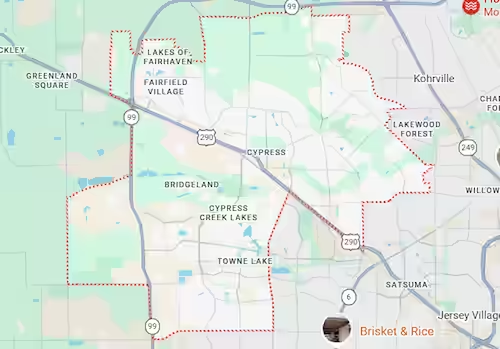
Mobile copier repair Cypress TX service is available throughout every commercial and residential location in Cypress TX. This includes medical offices along Cypress Creek Parkway, HOA management offices throughout Bridgeland and Towne Lake, real estate agencies along Spring Cypress Road and Barker-Cypress Road, Cy-Fair ISD school administrative offices, and all home office locations across zip codes 77429 and 77433. Call (346) 367-5911 as early as possible for same-day availability.
For Cypress TX home offices needing printer repair alongside the copier, visit Printer Repair Cypress TX for same-day service. Harry Repairs can address both devices in a single visit.
Copier Brands Harry Repairs Services in Cypress TX
Harry Repairs provides copier repair Cypress TX service for all major commercial brands used by Cypress TX businesses. This includes Canon, Ricoh, Konica Minolta, Xerox, Sharp, Kyocera, Toshiba, Brother, HP, and Lexmark. Both colour and monochrome multifunction copiers are covered, including all-in-one models that copy, print, scan, and fax. Large-format copying systems used by Cypress TX architectural firms and residential developers are also serviced. If your specific brand or model is not listed, call (346) 367-5911 to confirm availability.
Cypress TX Businesses and Neighborhoods Harry Repairs Serves for Copier Repair
Harry Repairs provides mobile copier repair Cypress TX service throughout every Cypress TX business district and residential community. Medical practices along Cypress Creek Parkway are covered. Legal and financial offices along US-290 are covered. Real estate agencies along Barker-Cypress and Spring Cypress Road are covered. Home offices throughout Bridgeland, Towne Lake, Fairfield, Longwood, BlackHorse Ranch, Copper Lakes, and Stonegate are all within the mobile service area. Every Cypress TX address is covered. Every Cypress TX address across zip codes 77429 and 77433 receives the same same-day response standard.
Frequently Asked Questions. Copier Repair Cypress TX.
How quickly can copier repair Cypress TX service reach my office?
Harry Repairs prioritises same-day response for Cypress TX businesses. Call (346) 367-5911 as early as possible to confirm same-day availability for your specific Cypress TX location. Most calls placed before midday receive a same-day on-site technician visit. Medical practices and businesses with urgent patient or client-facing workflows receive priority scheduling.
Do you service medical office copiers in Cypress TX?
Harry Repairs services copiers in medical practices and specialist clinics throughout the Cypress Creek Parkway corridor. Urgent care centres and outpatient facilities across all Cypress TX medical locations are also covered. The technician handles scan-to-email reconfiguration with awareness of HIPAA delivery requirements. Call (346) 367-5911 to discuss your practice’s specific copier situation and same-day availability.
Our Bridgeland home office copier keeps going offline. Can this be fixed permanently?
Yes, and Harry Repairs fixes this exact problem regularly in Cypress TX master-planned home offices. Your mesh Wi-Fi system is dynamically reassigning your copier’s IP address after every network optimisation cycle. Harry Repairs assigns a static IP address to your copier and configures your print drivers to match. Your copier stays connected permanently after this configuration change rather than dropping offline after every network event.
Our copier stopped working after the power came back on after a storm. Can it be repaired?
In most cases yes. Post-outage power restoration surges along the US-290 corridor frequently damage copier fuser controllers and electronic boards. These are repairable components in most commercial copier models. Call (346) 367-5911 immediately. Do not attempt to power the copier on repeatedly after a storm event. Each restart attempt after surge damage causes additional component stress.
Our copier is leased. Can Harry Repairs still service it?
Harry Repairs services both owned and leased copiers. Review your lease agreement before calling. This clarifies which repairs your lessor’s maintenance contract covers and which fall outside it. Harry Repairs discusses this with you honestly before any work begins. You understand exactly what the repair involves. You also know whether it falls within or outside your existing maintenance arrangement.
How long does a typical copier repair take at a Cypress TX office?
Most copier repairs at Cypress TX business locations complete within two to four hours during the on-site visit. Straightforward repairs such as ADF roller replacement, network reconfiguration, and scan-to-email setup complete faster. Drum unit replacement and fuser assembly replacement take longer but typically complete during the initial visit. Harry Repairs gives you a realistic timeframe after the diagnostic before any work proceeds.
Do you offer weekend copier repair for Cypress TX businesses?
Harry Repairs operates seven days a week from 10 AM to 8 PM. Weekend copier repair Cypress TX service is available for businesses preparing for Monday operations. Your medical practice needs patient forms ready for Monday morning. Your real estate office may be closing on Saturday. Your HOA management team prepares board meeting materials on Sunday. All receive the same same-day response standard. Call (346) 367-5911 to confirm Saturday or Sunday availability.
Can Harry Repairs fix our HOA management office copier in Bridgeland?
Harry Repairs services HOA management offices throughout Bridgeland and Towne Lake. Lifestyle coordinators and community operations teams across all Cypress TX master-planned communities are also covered. The technician comes directly to your management office location. Call (346) 367-5911 to schedule a same-day or next-morning on-site visit for your community management copier.
Get Fast Copier Repair in Cypress TX Today
Your Cypress TX business cannot function without its copier. Your medical practice cannot process patients. Your HOA management office cannot serve your community. Your real estate agency cannot close transactions. Your school administrative office cannot support your students and families. Every hour your copier stays broken has a direct operational cost that compounds through your entire day.
Harry Repairs delivers professional copier repair Cypress TX service today. Same-day on-site response throughout all Cypress TX business locations. Transparent upfront pricing. Quality OEM-standard components. A warranty on every repair. And a technician who understands your specific Cypress TX operating environment. Do not wait for a machine that will not fix itself overnight.
Call (346) 367-5911 now.
Shop: 3934 Farm to Market 1960 Rd W, Houston, TX 77068
Open 7 days a week, 10 AM to 8 PM.
Mobile copier repair available throughout all Cypress TX business locations and residential communities at no extra charge.